
Removed AntiVirus software still shows as installed? If Windows Security identifies old security software as still installed, see this post. You may have faced a situation where, even after uninstalling your old antivirus, firewall, or security software, your Windows Security Center continues to show it as still being installed. If you face this situation, you may want to try these troubleshooting steps. Action Center, previously known as Windows Security Center, monitors the security status of the computer. Before you begin, please back up the registry and create a system restore point.
Removed AntiVirus software still shows as installed on Windows 11/10
Windows identifies old security software as still installed
1) Check Registry for residual keys
This could happen because even after uninstalling the security software, it has left some remnants in your registry. Use its own standalone uninstallers to uninstall it completely. Otherwise try a freeware registry cleaner like CCleaner and see if it helps.
Additionally, open the Windows Registry, search for its keys and delete them. Let’s say the product is named ABCAV product of XYZCO company, then do a Find / Find Next for both ABCAV and XYZCO, and delete such keys found. I am assuming that you do not have any other software of XYZCO company installed.
2) Re-start the WMI Repository
If it doesn’t help, the problem may be resolved by re-starting the WMI Repository.
To do so, in start search > Type CMD in search > Hit enter. From the results, right-click Command Prompt and select ‘Run as Administrator’. Type the following command:
winmgmt /verifyrepository
If you get a message WMI repository is consistent, run the following command one after the other and hit Enter:
net stop winmgmt
cd /d %windir%\system32\wbem
ren repository repository.old
net start winmgmt
cmd command 2
If you get a message WMI repository is not consistent, run the following command:
winmgmt /salvagerepository
This will perform a consistency check on the WMI repository and resolve the issue.
Restart your machine.
After restarting your computer, if you receive the following message: winmgmt /salvagerepository is failed, ignore this message, and again run:
winmgmt /salvagerepository
Reboot.
3) Check GUID
If this doesn’t help, KB980867 suggests that you do the following. Open an elevated command prompt, wbemtest, and then press Enter. In the Windows Management Instrumentation Tester dialog box, click Connect.
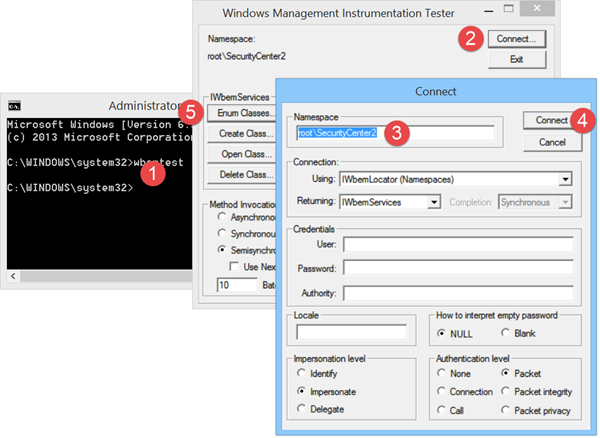
As appropriate for your version of the operating system, type the following in the Namespace text box:
For Windows Vista:
root\SecurityCenter
For Windows Vista SP1, Windows Vista SP2, Windows 7, Windows 8, Windows 10 and Windows 11:
root\SecurityCenter2
Click Connect.
Click Enum Classes.
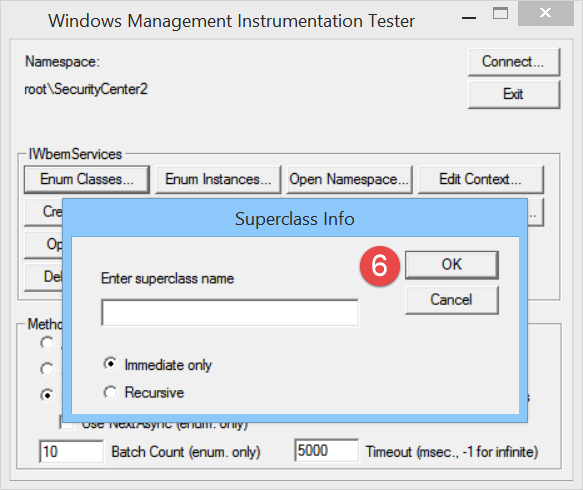
Leave the Superclass name text box blank, and then click OK.
Double-click AntispywareProduct, AntiVirusProduct, or Firewall Product, as appropriate for your version of the operating system.
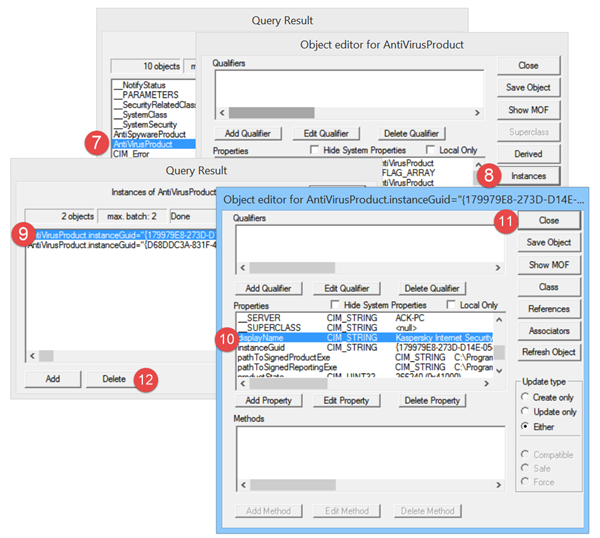
Click Instances.
For each GUID that is listed, follow these steps:
- Double-click a GUID.
- Locate the displayName property, and verify that the name matches the name of the security program that is uninstalled.
- Click Close.
- Select the GUID instance, and then click Delete.
How do I remove old security software?
It is pretty straightforward to remove old security software from your computer. If you are talking about the third-party security apps, you can use a software uninstaller tool to get them removed. For example, you can use the Revo uninstaller, CCleaner, or something like that on your computer. Whether you use Windows 11 or Windows 10, the process is the same.
Should I remove my old antivirus software before installing new?
Yes, it is recommended to remove the old antivirus software before installing the new one. Whether it is Kaspersky, Avast, Bitdefender, or anything else, you must remove the old one before installing the new one. Otherwise, your computer may get hanged and cause various problems at times.
Related reads that may interest you:
- Windows Security does not detect installed antivirus software
- Windows Security Center service can’t be started
- Windows Defender will not turn off even when 3rd party AntiVirus is installed.


