
If you find that your Windows 11, Windows 10, Windows 8.1 or Windows 7 is freezing, crashing, or is not responding randomly, the reasons could be many, and the solutions many too! Having your Windows computer freezing often can be really irritating. This post will just show you the direction in which you can work on. You may try these troubleshooting steps in no particular order. Before you start, do create a system restore point first, so that you can revert back, if you don’t like the changes.

Windows 11/10 keeps hanging, crashing or freezing
A system may hang, crash or freeze typically due to the following causes:
- CPU, Memory, disk resource exhaustion
- Hardware or Device Driver errors
- Windows is busy working on high-priority threads, spinlocks, waiting for an event, etc.
These suggestions are meant to show the direction in which you need to proceed. So first, go through the entire list and see which of these may apply in your case.
1. System Restore
See if a System Restore to a good prior old point helps make the problem go away.
2. Run Junk Cleaner
Run junk cleaner like CCleaner to clear up PC junk, and then run a full scan with your updated Antivirus software. In most cases, no registry cleaner or disk cleaner will stop freezes. A registry cleaner will not repair the Registry – it will only delete orphaned junk keys.
3. Run Windows Updates
Install the latest Windows Updates.
4. Disable Aero
Disable Aero, if your operating system has it and see if it’s helping.
5. Disable Indexing Service
Try disabling the Indexing Service.
6. Uninstall Crapware
Most such Windows freezes are caused due to Crapware installed on pre-installed OEM Windows machines. So open the Control Panel, check up which programs you don’t need and uninstall them. Clean up with a good Registry Cleaner to clean up residual junk registry entries. You may check out these free crapware removal software, that can help you identify these Craplets.
7. Check the start-up entries
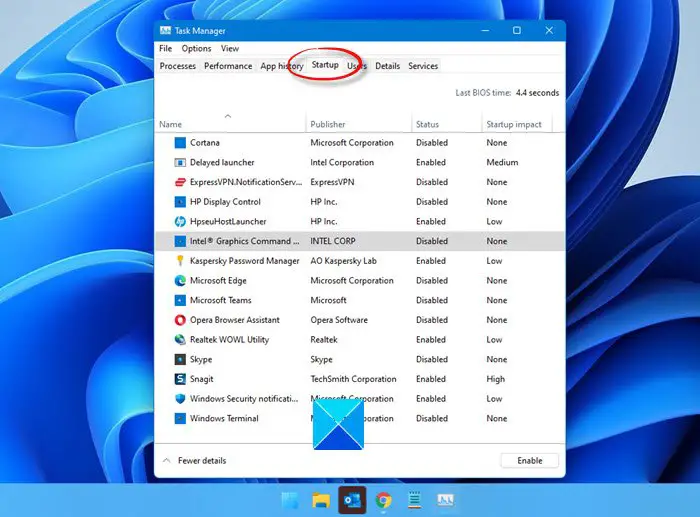
Check out the start-up entries and remove all start-up programs, that you do not need. Remove from Startups all those programs that you do not want starting up, every time your computer starts. I for one have only my security software as a startup, having disabled most others.
Read: VPN causes computer to crash or freeze
8. Check for Error Events
To do so, open Control Panel > Administrative Tools > Event Viewer > Custom Views > Administrative Events. Check if any recent events show a round red exclamation mark error icon. Double-click that error and an Event Properties window will pop up. See if the information helps you identify the problem.
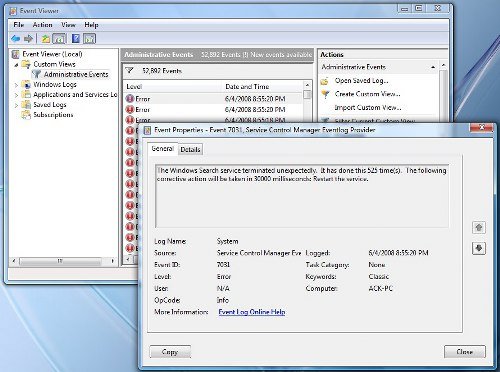
For example, if Windows Search Indexer does not work, due to the inability of the Search Service to start, then the system tends to freeze periodically. In such a case it is best to change the Recovery Actions for this service. To do so, open Services > Windows Search > Properties > Recovery Tab. For the first failure, choose Restart the service. For second and subsequent failures, choose Take No Action option. Apply > OK.
9. Check Drivers
Check for Bad or Outdated Drivers. They are known to cause freezes, especially during startup.
Read: Windows computer freezes while installing Graphics driver.
10. Hardware the issue?
Check if your hardware is the cause of these freezes.
11. See Reliability Monitor
See the Reliability Monitor. It lists the failures and the problems your machine may have faced.
12. Disable Fast Startup
Disable Fast Startup and see if that helps.
13. Run System File Checker and DISM
Run System File Checker and DISM.
14. Automatic Repair
If you are running Windows 11/10/8, open Advanced Boot Menu Options and select Automatic Repair.
If you are running Windows 7, open Advanced Boot Options screen > Repair your computer > Select keyboard layout > Next > System Recovery Options > Startup Repair.
15. Reset PC
You may also want to consider a Windows Reset.
TIP: See this post if you frequently receive 100% Disk Usage message.
If none of this helps you, you may have to consider Updating your BIOS. Take care while doing it.
Hope something helps!
You may want to check these links too:
- Computer freezes when printing
- Computer freezes when watching videos
- Computer becomes unresponsive when idle
- Computer Freezes and makes Buzzing or High Pitched Noise
- Windows crashes or freezes even in Safe Mode
- Computer freezes or crashes when closing Programs or Games
- Windows freezes at Login Screen
- Troubleshoot performance issues in Windows
- Program not responding.
Fix Freezes or Crashes with these resources from The Windows Club:
Windows Explorer crashes | Internet Explorer freezing| Edge browser hangs | Google Chrome Browser crashes | Mozilla Firefox Browser freezing.

