
You can use the Windows Task Scheduler to wake up your Windows computer wake from sleep mode, automatically at a preset time. This can be useful if you want a particular task performed at a particular time. Maybe you want to download large files at a specific time!

Wake up computer from Sleep at a particular time
To wake up your Windows computer from Sleep mode at a fixed time, type Task Scheduler in Start Search and hit Enter.
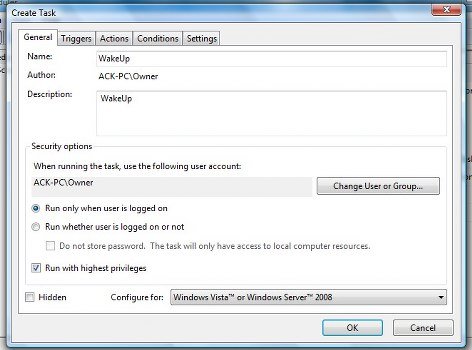
On the right side, select Create Task. A new window will open. Here, under the General tab, fill in the Name and Description. Also check, Run with highest privileges.
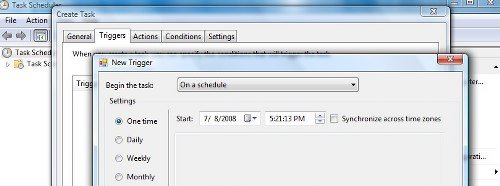
Under the Triggers tab, click New. Another window will open. Here. Select One time (or Daily if you want it repeated every day at a particular time). Set the Date and Time when you want your Vista to wake up from Sleep.
Next, under the Actions tab, you have to mention a task. Click New. You can run a simple task, like say, first launching & then closing the command prompt window. This thus will wake your Vista machine at the pre-set time to carry out the task!
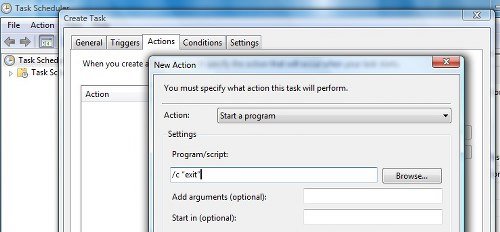
Select Action as: Start a program. To schedule a task that executes the command cmd.exe with command line arguments, copy-paste under Program/script
/c “exit”
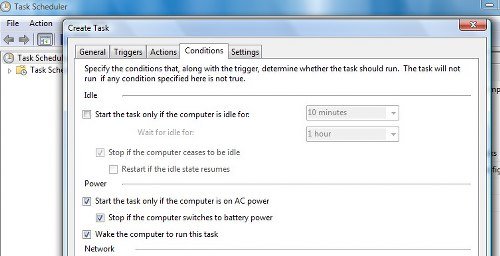
Under Conditions tab, check on the Wake the computer to run this task check-box. This is important!
Click OK and Exit Task Scheduler.
Your computer will wake up from Sleep at a particular time.
Also see:

