
Many actions and commands that you perform with the mouse can also be performed using combinations of keys on your keyboard. The keyboard shortcuts are often faster if multiple mouse clicks are required. In this article, we will talk about WinKey shortcuts on Windows 11/10. We will also see how to create your own WinKey shortcuts.
WinKey Shortcuts in Windows 11/10
Here are some shortcuts using the Windows Key, or WinKey, that work in Windows 11/10. The WinKey is the key with the Windows logo shown on it and it is usually found between the Ctrl and Alt keys on your keyboard. These shortcuts are also known as Microsoft keyboard shortcuts. It is not necessary to capitalize the letter you press in combination with the WinKey.

Below, I am listing some of the useful WinKey shortcuts below, for ready reference.
- WinKey: Opens and closes the Start Screen or Start Menu.
- WinKey + C: This keyboard shortcut works differently in Windows 11 and Windows 10. In Windows 10, pressing the Win + C keyboard shortcut opens Cortana in listening mode. This keyboard shortcut is disabled by default. Therefore, you have to enable it to use it. To turn it on, go to Start > Settings > Cortana. Now, turn on the “Let Cortana listen for my commands when I press the Windows logo key + C” option. In Windows 11, this keyboard shortcut opens Microsoft Copilot. Pressing it again closes the Copilot. Copilot is an AI assistant developed by Microsoft for Windows 11 users.
- WinKey + D: Minimize all windows to the desktop. Press again to reverse the action.
- WinKey + E: Opes the File Explorer.
- WinKey + L: Locks your computer.
- WinKey + F: Opes the Feedback Hub. Feedback Hub is an app developed by Microsoft. Normal Windows users and Windows Insiders can use it to report bugs, provide feedback, and suggest features to Microsoft.
- WinKey + M: Minimize all opened windows.
- WinKey + Shift + M: Maximizes all the windows after minimizing them.
- WinKey + R: Open the Run dialog box.
- WinKey + X: Opens the Quick Link menu.
- WinKey + U: Opens the Ease Of Access Center in Windows 10 and Accessibility settings in Windows 11.
- WinKey + Pause: Opens the Systems Properties dialog box in Windows 10. In Windows 11, this keyboard shortcut opens the About page in system settings.
- WinKey + F1: Opens Windows Help & Support.
- WinKey + B: Sets focus on the first icon in the Taskbar notification area (right corner of the Taskbar). You can use the right and left arrow keys to move the selection. For example, if the first icon in the Taskbar notification area is System Tray, pressing the WinKey + B keyboard shortcut will select the System Tray. Now, you can use the right arrow key to select the next icons in the Taskbar notification area. When you want to open the selection, press the Enter key.
You can see the huge list of keyboard shortcuts including WinKey shortcuts for Windows 11/10 here at Microsoft.
How to create your own WinKey Shortcuts
Apart from the standard WinKey shortcuts available to you in Windows, you can also create your own special WinKey shortcuts. To do so, you will have to use this freeware application.
Copernic WinKey was a nifty freeware but it appears to have been discontinued. But you can now check out WinHotKey. It assigns system-wide hotkeys and will let you launch an application, document, or folder. HotKey combinations typically include the Windows key, a letter or number, and a combination of Alt, Ctrl, and Shift keys.
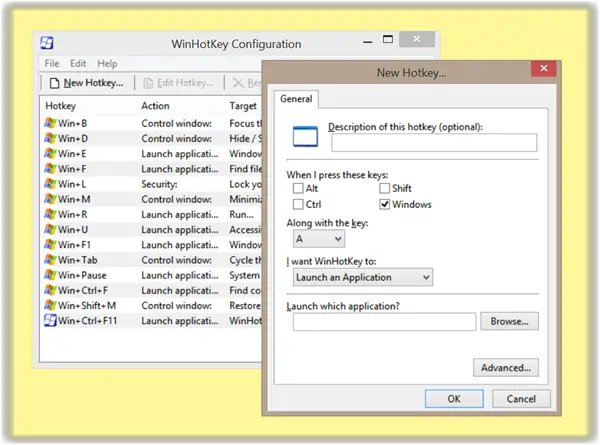
You can download WinHotKey from here and create your own hotkeys.
If you wish, you can also disable the Windows key.
That’s it. I hope this helps.
How do I create a shortcut on my desktop in Windows 11?
You can create a shortcut for any program, file, or folder on your desktop. To do so, right-click on the file or folder and select Send to > Desktop (create shortcut). If you want to create a desktop shortcut for a program, right-click on its executable file and select Send to > Desktop (create shortcut). In Windows 11, you have to expand the right-click context menu by selecting the Show more options.
What is WinKey shortcut keys?
The WInKey shortcut keys are used to open certain Windows features and apps on Windows 11/10. Most WinKey keyboard shortcuts are the same in Windows 11/10. However, some of them are different for both Windows 11 and Windows 10 operating systems.
Keyboard junkies may want to have a look at these posts too:

