
If you access or search Wikipedia frequently and if you would want to add an option to search Wikipedia from your Windows 11/10 Start Menu Instant Search Box, here is what you need to do.
Custom Instant Search Internet Search Provider
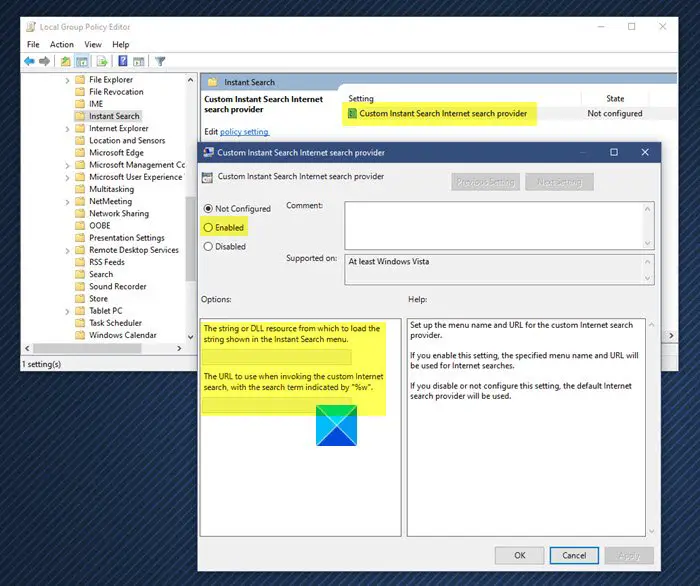
Search Wikipedia, Google from Windows Start Menu Search Box
In Windows 11/10/8/7/Vista, type gpedit.msc in the search bar and hit Enter to open the Local Group Policy Editor.
Navigate to this policy setting:
User Configuration > Administrative Templates > Windows Components > Instant Search > Custom Instant Search Internet Search Provider .
Click on Properties, to open its Properties box.
Enable the policy setting by selecting Enabled. Next in the first ‘string or dll…’ box type Search Wikipedia.
To be able to search Wikipedia, in the next ‘URL to use’ box, type the following:
http://en.wikipedia.org/wiki/%w
Click Apply > OK. Reboot.
If you wish to apply the changed policy setting immediately, open cmd.exe > gpupdate/force and hit Enter.
Now open your Start Menu. You should be able to see the Search Wikipedia option. Type a search term and click on Search Wikipedia; your browser will open with Wikipedia results.
Similarly, if you want to add Google instead of from Windows Start Menu Search Box, copy-paste the following URL instead:
http://www.google.com/search?q=%w
If you want to add Yahoo instead, copy-paste the following URL instead:
http://search.yahoo.com/search?p=%w
Windows 11/10 Home users may add Group Policy Editor to their OS first.
Now read: How to create a Virtual Hard Disk on Windows 11/10.

