
Windows Event Log service maintains a set of event logs that the system, system components, and applications use to record events. The service exposes functions that allow programs to maintain and manage the event logs and perform operations on the logs, such as archiving and clearing. As such, administrators can maintain event logs and perform administrative tasks requiring administrator privileges.
Windows Event Log Service Not Starting or Running
For some unknown reason, if you find you are having difficulty starting the following, it is quite possible that one of the reasons could be that Windows Event Log Service is Not Running.
- Task Scheduler
- Windows Event Calendar
- Messenger Sharing Folders
In such a scenario, you may get error messages like:
Event Log service is unavailable. Verify that the service is running
Windows could not start the Windows Event Log service on Local Computer
First, reboot your system and see if it helps. Sometimes a simple restart helps reinitialize this service. If the Windows Event Log shows as being started, re-start it from Services Manager.
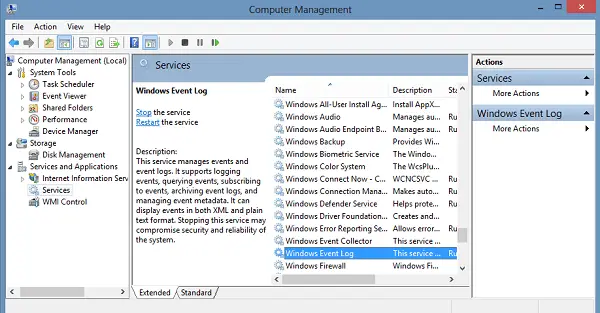
To check if the Windows Event Log service is started or stopped, Run services.msc and hit Enter to open the Services Manager. Here, again right-click on Windows Event Log Service, check up its Properties.
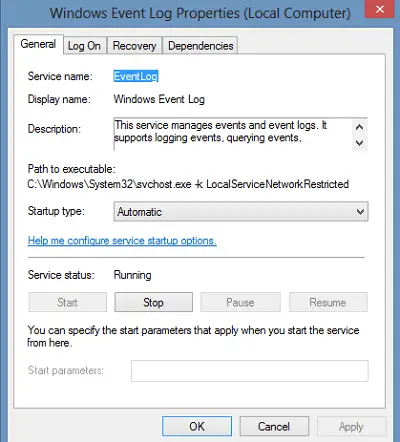
Ensure that the Startup type is set on Automatic and that the services is Started; and that it runs in the Local Service account.
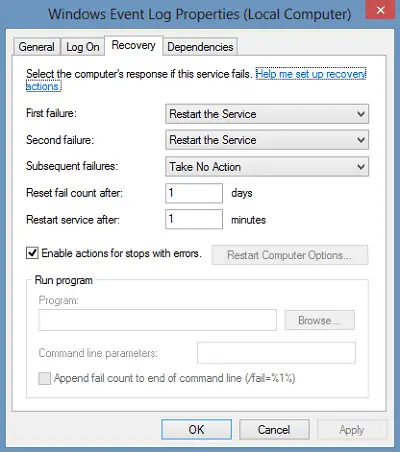
Also ensure in the Recovery tab, all three drop-down boxes, show the option as ‘Restart the Service’, in case of Failure. Reboot if required.
At times the Windows Event Log Service still will not start, and you may instead get the following error message:
System cannot find the file specified
In this case, open the following folder:
C:\Windows\System32\winevt\Logs
This logs folder contains Event Logs in .evtx format and can only be read with the Event Viewer. Give this logs folder Read-Write access rights and see if it helps.
You might also want to do the following.
Open Registry Editor and navigate to the following key:
HKEY_LOCAL_MACHINE\SYSTEM\CurrentControlSet\Services\eventlog
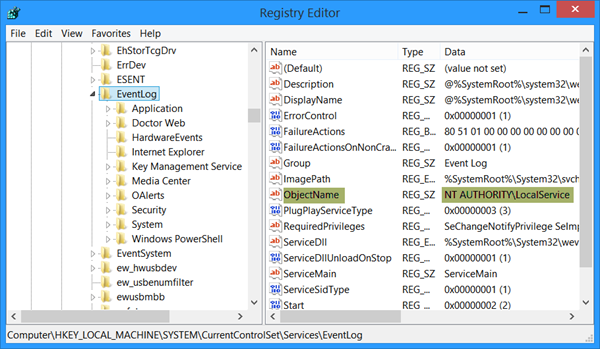
Double-click ObjectName and ensure that its value is set at NT AUTHORITY\LocalService. If it is not, then change it.
If it still does not help, run the System File Checker and go through its logs.
Read: Windows Event Log high CPU, Disk, Memory, Power Usage.

