Before working in the Windows Registry, it is always a good idea to back it up first, so that you have the option of restoration should something go wrong. This article shows the different ways to back up and restore the Windows Registry or its Hives.
Registry Backup file location
Windows 11/10/8/7 includes a scheduled task that creates backups of the Windows Registry regularly when the system is idle. These backups are placed in the following location, which is used in the System Restore operation:
C:\Windows\System32\config\RegBack
NOTE: In versions before Windows 10 v1803, Windows would automatically backup the Registry. These backups were available in the RegBack folder located at:
\Windows\System32\config\RegBack
Now the folder is still there, but things have changed, and you will see no files inside it. In case you face issues with your system, Microsoft now recommends you to use System Restore to restore your system rather than using Registry Backups – but you can make it automatically backup Registry to RegBack still.
Read: Where are the Windows Registry files located?
Backup and Restore Registry in Windows 11/10
Before you begin, it is a good idea to create a System Restore Point first.
Backup Registry
You can save or backup your Registry using Regedit or the Registry Editor in Windows. Open Run box, type regedit and hit Enter to open the Registry Editor.
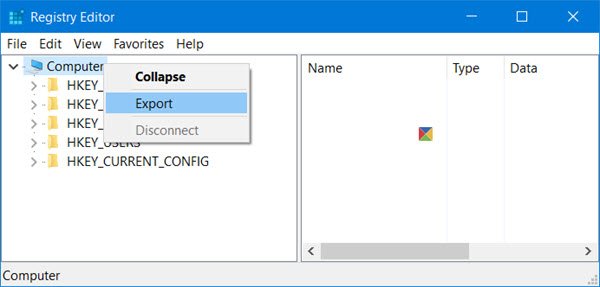
To back up the complete Registry, open Regedit, select Computer and right-click on it. Now select Export. Give the file a name and set a location where you want it saved.
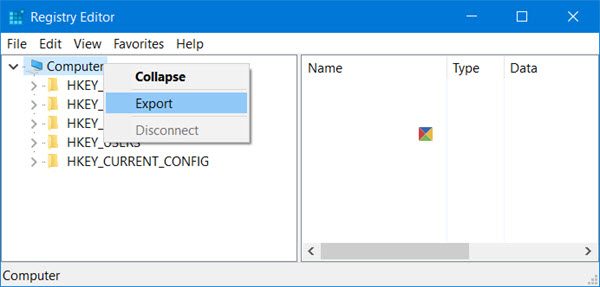
The complete registry backup will be saved as a .reg file.
To back up a part of the Registry, navigate to the Registry key or Hive that you wish to. To back it up, click File > Export.
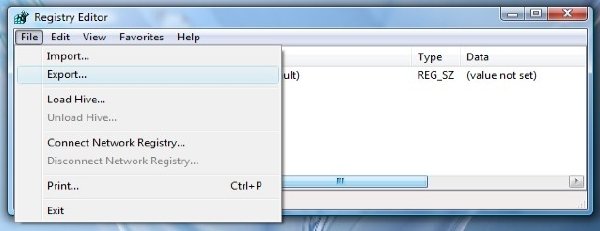
You can save or Backup your Registry in the following formats:
- A .reg registration file,
- Registry Hive Files. Saves a binary image
- Text Files which can be read in Notepad
- The older Win9x/NT4 format.

Select your Export range and Save as type and click on Save to save the backup.
Read: How to restore the Registry using Command Prompt.
Registry Keys that are not backed up when you create a system restore point
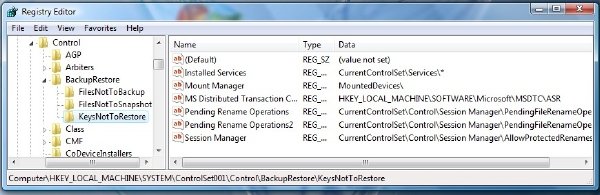
Most of the registry is backed up when you create a system restore point. I say most because the keys that are not included are listed at:
HKEY_LOCAL_MACHINE\System\ControlSet001\Control\BackupRestore\KeysNotToRestore
When & Why does Windows automatically save the Registry
The Windows operating system automatically saves the registry, every time a system restore point is created – whether automatically or manually by you.
This is useful, because when you restore your computer to a prior point, the OS needs the old registry backup too, in order to create a working restored computer. It is not important to only restore the files, but equally, if not more, important to restore the backed-up registry too. That is when and why Windows saves the Registry automatically.
A System Restore will affect your system files, programs, and registry settings. It can also make changes to scripts, batch files, and other types of executable files on your Windows computer. So any changes which have been made to these files will be reversed. System Restore will not affect your Documents folder or Personal files like photos, emails, etc, but you may find files on your desktop going missing. So you may want to move your personal documents from your desktop to a safe location before effecting a System Restore.
Read: Make Windows automatically backup Registry.
Restore the Registry
To restore the registry from an exported hive, in the left pane of the Registry Editor, select the desired Registry key, where you want restoration done.
Next, click Files > Import on the File menu. Navigate to the backed-up file. Click OK to the confirmation prompt.
Alternatively, you can double-click the backed-up .reg file to add it directly.
If you find this a bit difficult, you can always use free tools to achieve the same.
Read: How to repair corrupted or damaged Registry.
Free Registry Backup software
- RegBack is a free Registry backup software that lets you backup and restore the Windows Registry in a few seconds.
- ERUNTgui is a graphic user interface for the popular registry backup and restore program ERUNT and NTREGOPT.
- Registrar Registry Manager will let you easily manage Windows Registry.