
Whenever we need to detect and fix file system or disk corruption, we run the built-in Windows Check Disk tool. The Check Disk utility or ChkDsk.exe checks file system errors, bad sectors, lost clusters, and so on. If the disk is not in use, the tool runs immediately. But if any of the files on that drive are in use – like say the system drive, then we are required to schedule its scan at boot time.
ChkDsk will not run at startup
If in spite of your having scheduled chkdsk to run at startup, in Windows 11/10, it does not run, it could be because some kernel-mode component may be locking up the drive and preventing chkdsk autochk from running. It is quite possible that the BootExecute data value in the Registry has been changed or got corrupted. Here are a few troubleshooting steps you can try.
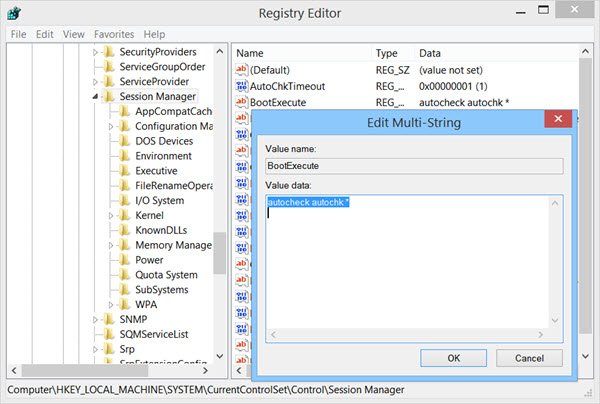
To check it, open regedit and navigate to the following registry key:
HKEY_LOCAL_MACHINE\SYSTEM\CurrentControlSet\Control\Session Manager
Ensure that the default value of BootExecute in the right side has been set at:
autocheck autochk *
If not, right-click on BootExecute and choose Modify.
Change the value to its Default, and click OK.
Now try again and see if Check Disk will run.
There is also a possibility that your autochk.exe file situated in the system32 folder may have got corrupted.
Run System File Checker or restore your system to a prior good point and check if it helps. This can help you replace the corrupted autochk.exe file with a good one.
If you need more inputs you can always take a look at the ChkDsk log files.
I hope this works for you!
See these posts if your ChkDsk or Check Disk Utility runs at every startup in Windows or if ChkDsk is stuck or hangs.

