
If you are security conscious, you may want to hide or remove the last username of the last logged-in users. In this post, we will see how to activate the Don’t display last signed-in setting in Windows 11/10/8/7 login screen, using Group Policy and Registry Editor.
You need to know that after Windows 10 version 1703, this Interactive logon: Do not display last user name policy setting is now renamed to Interactive logon: Don’t display last signed-in according to Microsoft documentation.
Don’t display last signed-in in Logon Screen in Windows 11/10
1] Using Group Policy
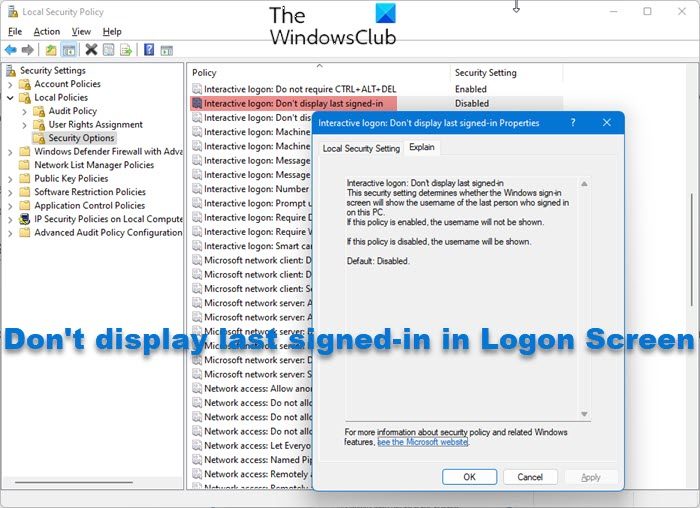
Type secpol.msc in Windows Start Search and hit Enter. This will open the Local Security Policy Editor. Navigate to Security Settings > Local Policies > Security Options.
Now on the right-hand side, in Windows 11/10 look for Don’t display last signed-in in Logon Screen.
In earlier Windows 10 versions you will see Interactive Logon: Do not display last username.
Right-click on it and open its Properties. Set it to Enabled > Apply.
This security setting determines whether the Windows sign-in screen will show the username of the last person who signed in on this PC. If this policy is enabled, the username will not be shown. If this policy is disabled, the username will be shown. Default is Disabled.
TIP: This post will show you how to hide your email address in Windows Lock Screen, using Group Policy or Registry Editor.
2] Using Registry Editor
Secpol.msc is available only in Windows Ultimate, Pro and Business.
However, secpol is basically just a GUI for the registry settings found in the registry at:
HKEY_LOCAL_MACHINE\Software\Microsoft\Windows\CurrentVersion\Policies\System
Users of other versions of Windows may do the following. Open regedit and navigate to this key mentioned above.
Right click > dontdisplaylastusername > Modify > Value Data > 1 > OK.
This should do the job.
Best to always create a System Restore point before working in the registry.
Go here if you want to Change Ctrl+Alt+Delete options or Disable Secure Logon Ctrl Alt Del in Windows 11/10.

