
If when you try to move or rename files or folders on your Windows computer, you cannot move or rename files or folders, you get the error message The File or Folder does not exist, then this post will help you fix the problem on your Windows Vista or Windows 10/8/7 machine.
The File or Folder does not exist
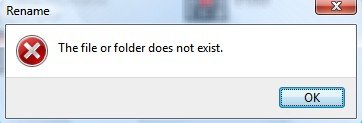
The options you have are:
- Restart your PC and try once
- Potential Registry corruption
- Run SFC and DISM
- Run ChkDsk
- Run Windows File and Folder Troubleshooter
- Perform Clean Boot and try to rename.
1] Restart your PC and try once
Try the simplest! Restart your PC and try once again and see if it works.
2] Potential Registry corruption
It is quite likely that the issue is being caused due to deletion of the Registry branch:
HKLM\Software\Microsoft\Windows\CurrentVersion\explorer\FolderDescriptions
If you have installed update KB938979 by using vLite, edited Windows system files, you are most likely to be facing this problem. Uninstalling the update is not known to help, as its a case of registry corruption. What you need to do is restore the missing registry hive to its default settings.
3] Run SFC and DISM
Run System File Checker and DISM to resolve the issue.
4] Run ChkDsk
Run ChkDsk and see.
5] Run File and Folder Troubleshooter
Windows 10/8/7 users may want to use the Windows File and Folder Troubleshooter. It will also help fix this The File or Folder does not exist error message.
6] Perform a Clean Boot and try to rename
Perform Clean Boot and try to rename. Maybe it will help.
All the best!

