
If your Windows File Explorer crashes or freezes, or you see an error message Windows Explorer has stopped working and is restarting, on your Windows 11/10 computer, then this post will help you fix the Explorer freezing or crashing issues.
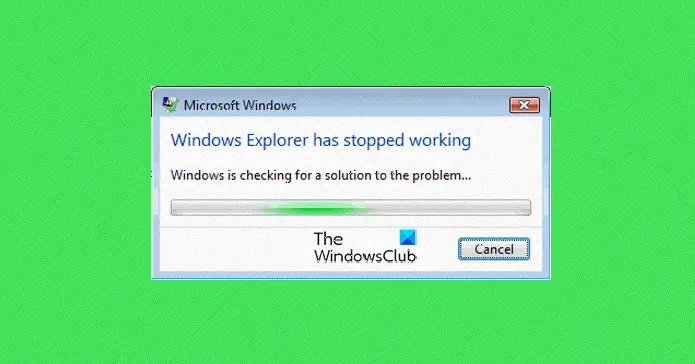
The Explorer.exe process in the Windows operating system, helps us browse our files, folders, and other data on our computer. You may face a problem at some point in time when you find that your Explorer crashes or freezes frequently. Additionally, you may also receive the following message:
Windows Explorer has stopped working
This tutorial includes some troubleshooting steps that will help you address the Windows Explorer crashing or freezing issues. Quite possibly it’s one of your installed programs that may be interfering with the smooth functioning of explorer.exe. You may have to check them all. Hopefully, one of the suggestions should help you. If an option doesn’t help you, you may want to restore it to its default, where applicable & possible.
Go through the entire list first before you decide to implement any of our suggestions and remember to create a system restore point first so that you can always restore should the changes not be to your expectations.
File Explorer keeps crashing or freezing in Windows 11/10
If your Windows File Explorer crashes or freezes frequently, you need to carry out the following actions that may help you fix the problem:
- Disable the Preview Pane
- Disable Thumbnails
- Disable UAC temporarily
- Disable DEP and see
- Launch the folder windows in a separate process
- Check installed Add-ons
- Run System File Checker
- Update Video drivers
- Troubleshoot in Clean Boot State
- Windows Memory Diagnostics Tool
- Explorer crashes in a particular Video folder
- Other suggestions.
Let us go through the suggestions in detail. Before you begin, Run Check Disk and see if a System Restore makes the problem go away. Also ensure that your Windows is up-to-date, and all Windows Updates have been installed. Next, scan your computer for malware. If you have bought a new Windows 10/8/7 laptop, maybe some pre-installed craplets are interfering with explorer.exe. Remove unwanted trialware and de-crapify your machine then.
File Explorer getting closed automatically
1) Disable the Preview Pane
Disable the Preview Pane in File Explorer and see if it helps. To disable the Preview Pane, click Organize > Layout > Preview Pane.
2) Disable Thumbnails
Disable Thumbnails and see if this stops the problem. To do so, open Folder Options > View tab > Check Always show Icons, never thumbnail. Also, remove the check for the option to Display file icon on thumbnails. Click Apply/OK.
3) Disable UAC temporarily
Disable UAC temporarily and see if it helps.
4) Disable DEP and see
Disable DEP or NoExecute Protection. Do note that Data Execution Prevention (DEP) is a security feature that can help prevent damage to your computer from viruses and other security threats. Harmful programs can try to attack Windows by attempting to run (also known as execute) code from system memory locations reserved for Windows and other authorized programs. These types of attacks can harm your programs and files. DEP can help protect your computer by monitoring your programs to make sure that they use system memory safely. If DEP notices a program on your computer using memory incorrectly, it closes the program and notifies you.
To do so, Run command prompt as Administrator. Then copy-paste the following and hit Enter:
bcdedit.exe /set {current} nx AlwaysOff
This has been known to help in Windows 11/10/8/7/Vista.
Read: Windows Explorer High Power Usage
5) Launch the folder windows in a separate process
Launch the folder windows in a separate process and see if it helps. To do so, open Explorer. Click Organize > Folder & Search Options > View > Advanced Settings > Check ‘Launch folder windows in a separate process’ > Apply > OK.
Read: Program exe or COM Surrogate has stopped working.
6) Check installed Add-ons
Installed Add-ons are usually the culprit! Check if you have installed any helpers or add-ons to your explorer. Uninstall or disable them. Often, even 3rd-party shell extensions can cause Explorer to crash on particular actions. Several programs add items to the right-click context menu. To see them in detail, you may download the freeware utility ShellExView.
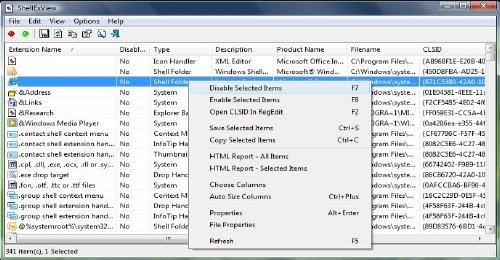
It will let you view & disable suspect 3rd party shell extensions. Using the trial & error method, you may disable/enable the extensions to try and identify if any of them are causing a problem. ShellExView can also be used for solving context-menu problems in Explorer, like, say, if the right-click is slow.
7) Run System File Checker
Run sfc /scannow and at the end reboot if the system file checker asks for it. The System File Checker will on reboot, replace corrupt system files if any are found.
8) Update Video drivers
Outdated or corrupt video drivers can cause Windows Explorer to stop working. Update your Graphics drivers and see if it helps.
9) Troubleshoot in Clean Boot State
Start your Windows in Safe Mode, and see if you can recreate the problem. If the problem has disappeared, then it’s probably some startup program that is interfering with the smooth functioning of Explorer. Perform a Clean Boot and try to troubleshoot and identify the offending program.
10) Windows Memory Diagnostics Tool
Run the Windows Memory Diagnostics Tool to check for possible memory problems, including testing of the Random Access Memory (RAM) on your computer.
11) Explorer crashes in a particular Video folder
Here’s what you need to do if you face this issue:
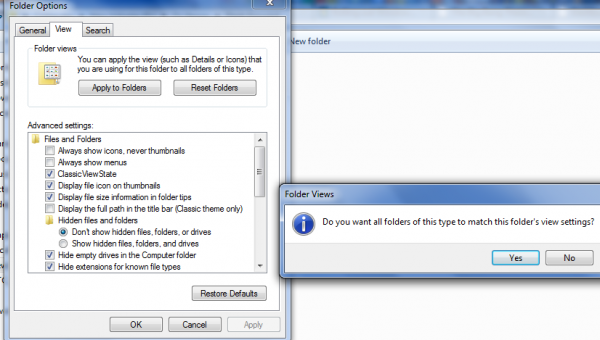
- Open any other folder having similar content viz. video files, and change the View setting to List
- Next, go to Tools > Folder Options > View Tab
- Under the View tab Click Apply to Folders and Press Yes.
Now all the folders having a similar content will automatically show their content in the List view .
12) These Explorer related fixes may also interest you:
- Explorer crashes when you right-click
- File Explorer crashes or freezes when creating New folder
- Explorer crashes or freezes while accessing Mapped Network Drives
- Explorer crashes after resizing or snapping
- Explorer.exe High Memory & CPU usage
If your Windows Explorer crashes randomly in Windows 7 or Windows Server 2008 R2 in a network environment, apply this hotfix from KB2638018. Also, see if KB930092 and KB931702 about Explorer crashes apply to you.
How do I repair File Explorer?
The only reliable ways to repair File Explorer are to run System File Checker, Run the DISM tool, Run Automatic Startup Repair, or, if that does not help, use the Reset PC option. Automatic Startup Repair is a tool that attempts to fix registry corruption.
Fix Freezes or Crashes with these resources from The Windows Club:
Windows 11/10 freezes | Internet Explorer freezes| Google Chrome Browser crashes | Mozilla Firefox Browser freezing | Edge browser hangs | Microsoft Outlook freezes | Computer hardware freezes.

