
Windows users must have observed this phenomenon. While creating a shortcut for a file/folder of your choice a small curved Shortcut Arrow is attached to the newly created shortcut as well as Shortcut text is added. This occurs by default. Should you wish to remove them, follow this tutorial.
Please note that this requires you to make changes in the registry and hence the usual words of wisdom apply – create a system restore point first or back up your registry before proceeding any further.
Remove Shortcut text
If you do not like the Shortcut text which Windows 11/10/8/7 adds to all-new shortcuts, here is how you can remove it. Open registry editor by pressing Win+R in combination to bring up the RUN dialog box. In it, type regedit and press Enter.
Next, navigate to the following key:
HKEY_CURRENT_USER\Software\Microsoft\Windows\CurrentVersion\Explorer
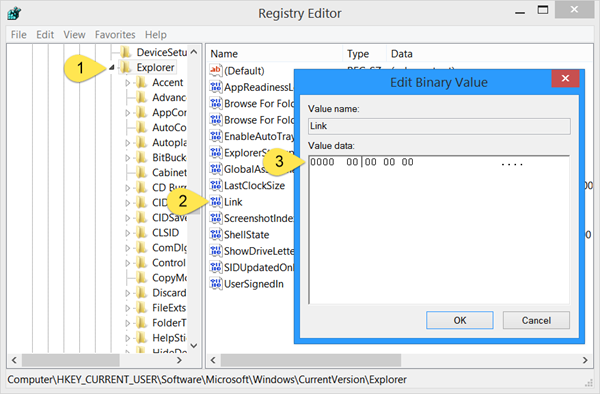
Double click on ‘Link‘ and set its Value data to: 00 00 00 00.
When done, restart your Explorer or computer.
To implement this change for all users on a computer, modify the Link value in the following registry keys:
HKEY_USERS\.Default\Software\Microsoft\Windows\CurrentVersion\Explorer
HKEY_USERS\username\Software\Microsoft\Windows\CurrentVersion\Explorer
To restore the Shortcut text, delete the Link value.
Remove Shortcut Arrow
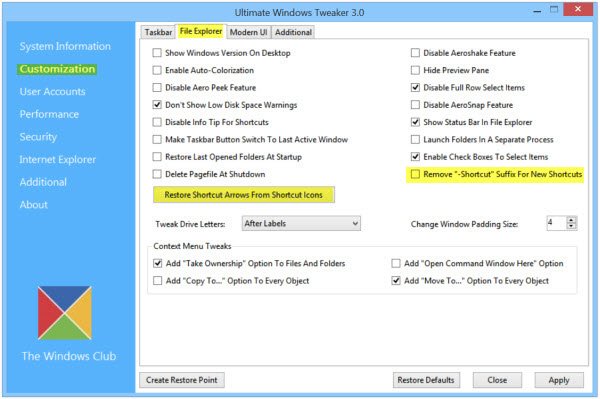
To remove the Shortcut Arrow overlay icon which gets added, you can use our freeware Ultimate Windows Tweaker. In fact, using this free tool, you will be able to easily remove the Shortcut Arrow overlay icon as well as the Shortcut text.
You will find the tweaks under Customization > File Explorer tab as Remove “-Shortcut” suffix for new Shortcuts and as Remove/Restore Shortcut Arrows from Shortcut icons.
Hope this helps!

