
I have realized that corruption in the Windows registry can lead to many problems. Some of you may have faced this problem that after you logged on to your computer, you might have seen just a blank screen. No desktop, no Taskbar! This may happen because explorer.exe which is supposed to start up automatically, did not start at all. While some registry errors might have caused this issue, it is certainly possible the problem could be due to some virus infection too, which blocks the Windows File Explorer from running.

Explorer.exe does not start in Windows 11/10
In such situations where your Windows 11/10 explorer.exe fails to start-up automatically on every boot, here are a few steps you can try out:
- Check and disable addons and see
- Check Registry setting
- Run System File Checker
- Run System Restore
- Troubleshoot in Clean Boot State
Let us see the process in detail.
1) Check and disable addons and see
Check if any add-ons may be interfering with its starting up. Often, 3rd-party shell extensions can cause Explorer to crash on particular actions. Several programs add items to the right-click context menu. To see them in detail, you may download the freeware utility ShellExView.
2) Check Registry setting
Back up your Windows Registry first, and then open regedit and navigate to the following :
HKLM\SOFTWARE\Microsoft\Windows NT\CurrentVersion\Winlogon
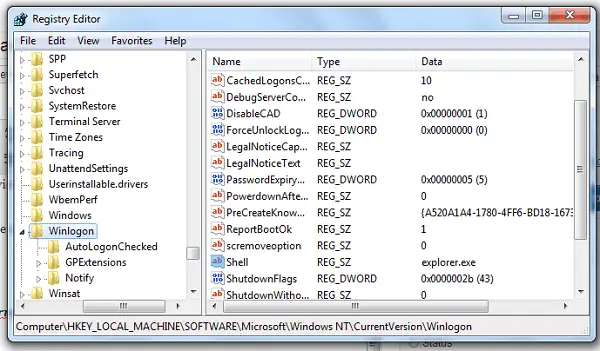
In Winlogon, on the right side, you should notice a value called “Shell“. In the RHS Pane, ensure that the default string value of Shell is explorer.exe.
Double-click this value. Make sure only ‘explorer.exe‘ is given the value of Shell. If you see anything else there, simply delete it and leave only ‘explorer.exe’ .
Exit the Registry Editor.
Restart the computer for the changes to take effect.
Related: Fix File Explorer will not open in Windows.
3) Run System File Checker
Open command prompt as admin and Run sfc /scannow.
Read: Windows cannot find explorer.exe
4) Run System Restore
See if a System Restore helps you.
5) Troubleshoot in Clean Boot State
Start Windows in Safe Mode and see if your explorer.exe will start in safe mode. If it does, then obviously something is interfering with its normal start in regular mode. I suggest you scan for malware in safe mode, remove infections if any, and reboot. If you need to manually troubleshoot, you may perform a Clean Boot.
Why is explorer.exe not running?
The main reason why Windows File Explorer is not running is because you have corrupt system files or malware or adware. That said, you need to check the Task Manager for possible malicious files, use an antivirus to scan, use adware removal tools to get rid of adware, and more. If nothing helps, you need to restore your PC.
How do I manually restart explorer.exe?
To manually restart explorer.exe or Windows File Explorer, you need to take the help of the Task Manager. Therefore, open the Task Manager and find the Windows Explorer process. Next, click on it to select and click on the Restart button. It will restart the process or Windows File Explorer within moments.
Related read: Windows File Explorer crashes, freezes, or has stopped working.

