
If you have created a new user account in Windows and if you’d like to transfer all your user data or user profile to this new user account, here is how you may move or migrate your User Profile easily.
Windows Easy Transfer was introduced in Windows Vista and included in Windows 7, Windows 8, and Windows 8.1. Windows Easy Transfer is not available in Windows 11 or Windows 10. However, Microsoft has partnered with Laplink to bring you PCmover Express—a tool for transferring selected files, folders, and more from your old Windows PC to your new Windows 10 PC.
Transfer User Profile to new user account in Windows
To transfer your user profile and files, log on with the new user account that you may have created. Make sure that this new user account has Administrator privilege.
Windows Easy Transfer
The built-in Windows Easy Transfer wizard will help you transfer files and settings from one computer running Windows to another. It helps you choose what to move to your new computers, such as user accounts, Internet favorites, and email.
To run it, type Windows Easy Transfer in a Start search box and hit Enter to open it.
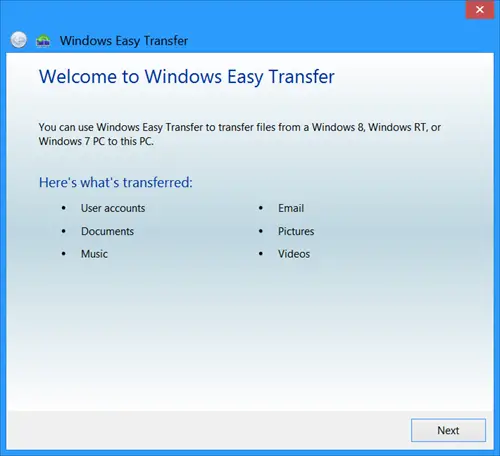
Click Next to start the wizard.
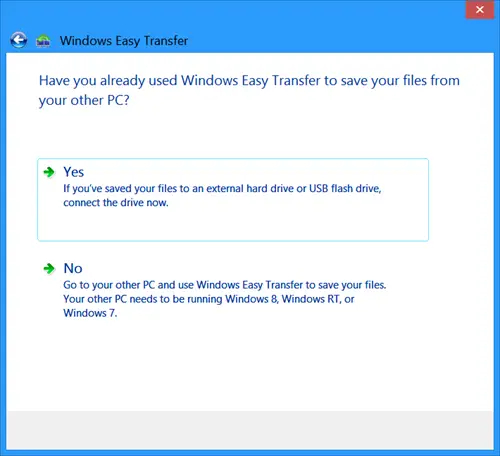
If you have already saved your files to an external hard drive, connect the drive, click Yes and then follow the wizard. If you haven’t done so yet, go to the other PC and use Windows Easy Transfer to save your files. Clicking on No will exit the wizard.
Windows Easy Transfer can’t transfer files from a 64-bit version of Windows to a 32-bit version of Windows. If you’re transferring from a 64-bit version of Windows to a 32-bit version of Windows, you can move your files manually or use Backup and Restore.
Related: How to move User Profile to another Drive in Windows
NOTES:
- Windows 11/10 users can simply copy your folders from the old computer to a USB drive or Disk and then move them from the USB drive to your new computer.
- If your old PC is 64-bit, you can easily move your data to your new one with the external drive. Copy the C:\Windows\System32\Migwiz folder from the old Windows 7 PC onto the drive. Connect the external drive to your new Windows 10 PC. Run “Migwiz.Exe” from the “Migwiz” folder you copied from the Windows 7 PC and continue with the Easy Transfer Wizard.
- You can also migrate a User Profile to another new Windows PC.
- Some of you might want to take a look at Transwiz User Profile Transfer Wizard and ForensIT User Profile Transfer Wizard too.
Back up User Profile folder manually
If you want to back up the User Profile folder manually, open Windows Explorer. Click on Organize. From the options displayed, select ‘Folder and Search Options’.
Next, from the ‘Folder Options’ screen choose the ‘View’ tab. Check Show hidden files and folders box > OK to save settings.
Now navigate to your C:\Users\(Old Username) folder and copy all the files and folders in the C:\Users\(Old Username) folder to the C:\Users\(New Username) folder.
To copy all these files and folders easily, use Ctrl+A, and then Ctrl+C. To paste them use Ctrl+V.
I hope this helps.
How do I transfer Windows profile to another computer?
There are multiple ways to transfer Windows profiles to another computer. However, using a third-party program is probably the best way to get things done. For this purpose, you can find plenty of tools such as Windows Easy Transfer (in-built), Transwiz, etc. You can pick any of them to get started with the process.
What else can Windows Easy Transfer do?
Windows Easy Transfer can migrate your entire user profile from one computer to another within moments. Whether it is your wallpaper or Library folders, documents, images, etc., you can use this app to transfer all of them to a new computer.
Check this if you receive the You’re currently logged on using a temporary profile error message while using Windows Easy Transfer.

