
Many miss playing the 3D Pinball Space Cadet game in Windows 10. Windows XP had it, but Microsoft chose not to include this classic in later versions of Windows. If you want to play the classic Pinball game on Windows 11/10, you can do so.
Classic 3D Pinball game for Windows 11/10
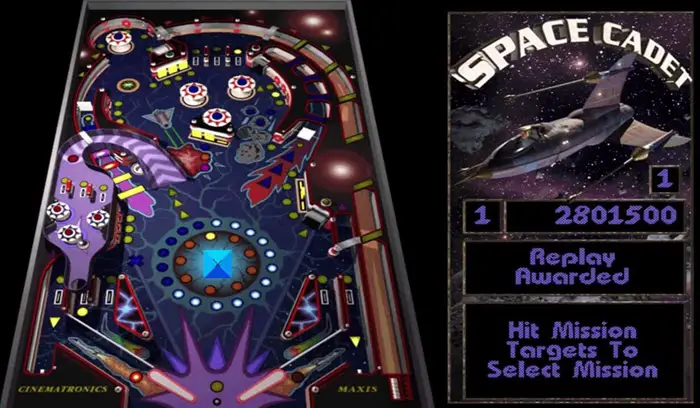
If you like this game, you can try and play it in later Windows versions too.
To do so, check if any friend of yours has a Windows XP machine running. Copy the Pinball game folder located in the following folder
C:Program Files\Windows NT
and paste it in the following folder on your Windows 10/8/7 computer:
C:\Program Files\Microsoft Games
Next, create its shortcut in the same folder and cut-paste this shortcut in the following folder:
C:\ProgramData\Microsoft\Windows\ Start Menu\Programs\Games
You will now be able to access & play the 3D Pinball game from your Windows Start menu’s Games folder.
Microsoft had explained the reason for dropping this game earlier:
One of the things I did in Windows XP was port several millions of lines of code from 32-bit to 64-bit Windows so that we could ship Windows XP 64-bit Edition. But one of the programs that ran into trouble was Pinball. The 64-bit version of Pinball had a pretty nasty bug where the ball would simply pass through other objects like a ghost. In particular, when you started the game, the ball would be delivered to the launcher, and then it would slowly fall towards the bottom of the screen, through the plunger, and out the bottom of the table. We had several million lines of code still to port, so we couldn’t afford to spend days studying the code trying to figure out what obscure floating point rounding error was causing collision detection to fail. We just made the executive decision right there to drop Pinball from the product
But if you wish you can now also download it from TechSpot. Let us know how it worked for you.
Classic 3D Pinball Star game for Windows 11/10
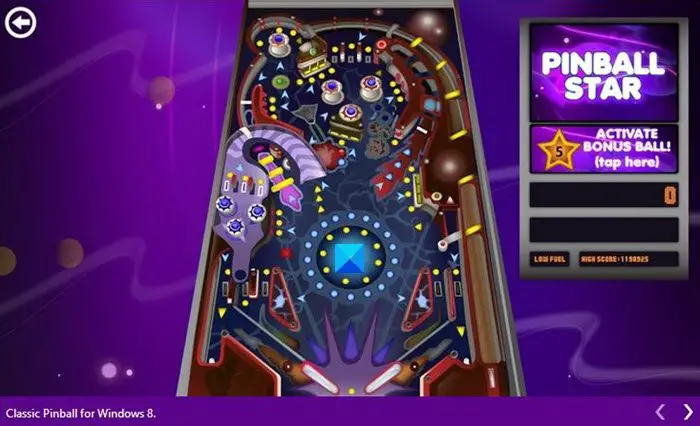
If you are one of the millions of Pinball fans around, there is more really good news for you. The brilliant classic Windows Pinball game is now available for Windows 11/10/8.1 from the Microsoft Store
3D Pinball is back, for Windows users! It offers brand new tables and a host of new features and improvements, including new advanced graphics and sounds. The look and appearance might not be as good as the original one, but then again it makes you re-live classic Pinball memories.
The classic game named 3D Pinball Cadet Game was once the most popular game amongst Windows XP users. If you were a Windows user before the launch of Windows Vista, you might surely have played and enjoyed the classic 3D Pinball Cadet Game which was commonly referred to as just Pinball. The last time Pinball was built-in with the Windows OS was when Microsoft shipped Windows XP computer systems. Pinball was removed from Windows further due to porting issues from 32-bit platforms to 64-bit builds.
The classic Pinball-Cadet Game is now back with a new name “Pinball Star”. You can now re-live the thrilling experience on your new Windows devices.
The all-new Pinball Star app for Windows 8.1 is beautifully designed with excellent graphics and upbeat music. The app is fast and downloads/installs in a few minutes. High-end graphics and touch-friendly control buttons provide a wonderful gaming experience to users. The flippers and control buttons respond great to touch.
Pinball Star is designed for the original Pinball game which was last bundled with Windows XP. Responsive paddles, fun sounds, and neat graphics give a fun experience on touch-enabled devices.
Features:
- Classic Pinball
- 16 Missions
- Achievement badges
- Highscore leaderboards
- Customize your controls
- Great graphics and sounds.
However, a few of its functions do not work like the original Pinball game. For example, the ball is not as shiny as it was in the original 3D Pinball and the look is not very realistic as that of the original one.
You can download the game from Microsoft Store.
TIP: There are other Pinball game apps for Windows available as well.
If you were once a Windows XP user, this new game would definitely invoke the nostalgia for the 3D Pinball Cadet Game found on your old Windows XP PC. Both apps are free, check them out and let us know how you like them.
Related: How to download Windows 7 games on Windows 11.

