
Some Windows errors are very commonly encountered. You may encounter them every once in a while. One such error you may encounter while opening a .exe file is: Windows cannot access the specified device, path or file, You may not have the appropriate permissions to access the item.
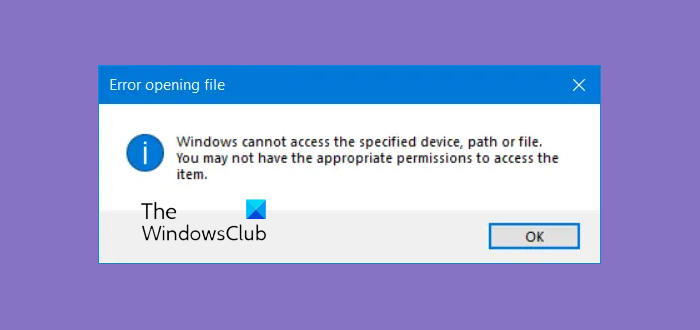
This error message can be related to files like svchost.exe, regsvr.exe, spoolsv32.exe, taskmgr.exe, sys.exe, rundll.exe, explorer.exe, csrss.exe, winupdate.exe or even any .exe program file of software you may have installed on your Windows computer.
Maybe these system files have got corrupted due to malicious infections and maybe your antivirus may have deleted the system file because your PC was infected by one of the malicious programs – the reasons could be many. If it’s a system file that is creating a problem, running the System File Checker might be a good idea.
What does Windows cannot access the specified device, path or file mean?
It is clear from the error message that you do not have permission to access the file or the location at which the file is placed. Hence, this error is majorly caused due to permission issues. You may also see this error if your antivirus is blocking the file.
Windows cannot access the specified device, path or file, You may not have the appropriate permissions to access the item.
Here are a few troubleshooting steps you may try to fix the error. But you will have first to ensure that the file is not in a location that is currently accessible, like maybe a network location or an external drive that is not currently connected to the PC, etc. Also, check that the file has been moved or deleted.
1] You don’t have read or write permission to the specified path
Check if you have permissions to open the file. If required Run as administrator and see if it helps. Else you may have to take ownership of the file. You may use our Ultimate Windows Tweaker to do so easily. Ultimate Windows Tweaker will let you add the Take ownership of Files and Folders option easily to even Windows 11/10.
Tip: RegOwnit lets you take full control & ownership of Windows registry keys.
2] Check the shortcut
If it is a shortcut that you are clicking on to open the file, you may want to check if the target file is still located at the destination. If yes, then maybe the shortcut itself may have got corrupted. Delete it and create a new shortcut.
3] Ensure that the file has not been deleted
Browse to the location of the file and make sure the file exists, because you can receive this error if the file has been moved.
4] Shortcut corrupted
Maybe the shortcut has become corrupted. Recreate it and see.
5] Check the location
Check if you are attempting to access a location that is not currently available such as a networked or a removable drive.
6] This file came from another computer and might be blocked to help protect this computer
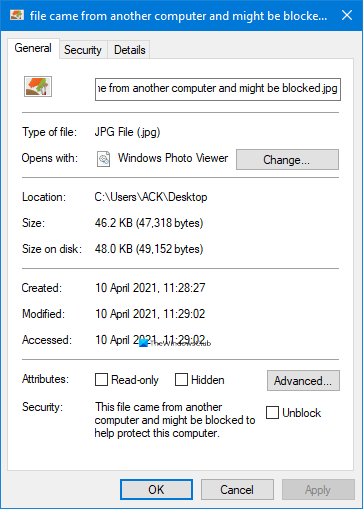
If the file has been downloaded from the Internet, right-click on the file and open Properties.
Under the General tab, towards the bottom you will see classified under Security: This file came from another computer and might be blocked to help protect this computer.
Click on Unblock. Click Apply > OK. This should help.
Related: You need permission to perform this action on Windows 11/10.
7] Check if your antivirus software is blocking the file
You may also want to check if your antivirus software is blocking the file for some reason. If you are convinced that the file is safe, temporarily disable your security software and then try to open the file.
Related: Windows cannot find Make sure you typed the name correctly.
How do I enable access permission?
If you are unable to access the file because of permission issues, first, check if you are signed in to Windows 11/10 with an administrator account. If despite logging in to Windows 11/10 with an administrator account, you cannot access the file, you have to take ownership of that file to enable access permission.
I hope something helps you!

