One way of adding one more layer of security to your Windows computer is by enabling secure logon. By enabling secure logon, users are required to press Ctrl+Alt+Del before they can enter their credentials and log on.
Does Ctrl Alt Delete work on Windows 11?
Yes, Ctrl Alt Delete works on Windows 11. Microsoft introduced it to provide Windows 11/10 users with an additional layer of security. If this feature is enabled, users have to press the Ctrl + Alt + Delete keys before entering their password on the login screen. This prevents malicious programs from capturing the users’ passwords on the login screen.
Why use Ctrl Alt Delete for login?
Ctrl Alt Delete is an additional security layer for Windows 11/10 computers. Users have to press the Ctrl + Alt + Delete keys before entering the login password. Since it requires users to press the required keys to see the login screen, this path of signing into Windows is secure, as this keystroke sequence cannot be intercepted by any application or malware.
Ctrl+Alt+Del or Secure logon in Windows 11/10
Secure logon offers a keystroke sequence that cannot be intercepted by any application. When Secure Logon is enabled, no other malicious program can intercept your user name and password as you enter it.
Pressing Ctrl+Alt+Del ensures that the authentic Windows logon screen appears. To enable secure logon, open Run, type Control Userpasswords2 or netplwiz and hit Enter to open the User Accounts Properties box.
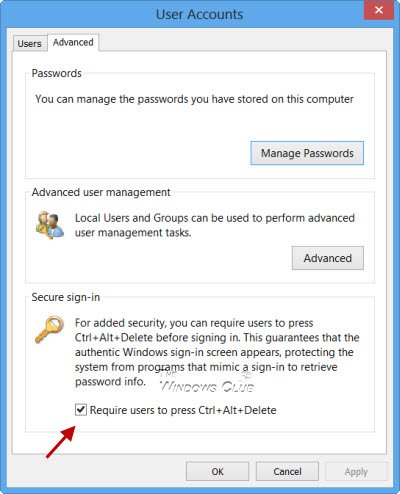
Open the Advanced tab, and in the Secure logon section, click to clear the Require users to press Ctrl+Alt+Delete check box if you want to disable the CTRL+ALT+DELETE sequence. Click Apply/OK > Exit.
Now the next time to logon you will see your Windows 8 lock screen with the following display in the top-left corner.

Pressing Ctrl+Alt+Del will allow you to enter your Windows logon password.
Read: How to display information about previous logons in Windows.
Disable CTRL+ALT+DELETE using Group Policy
If you wish, you can also enforce this policy, using the Local Security Policy. To do so, Run secpol.msc and hit Enter.
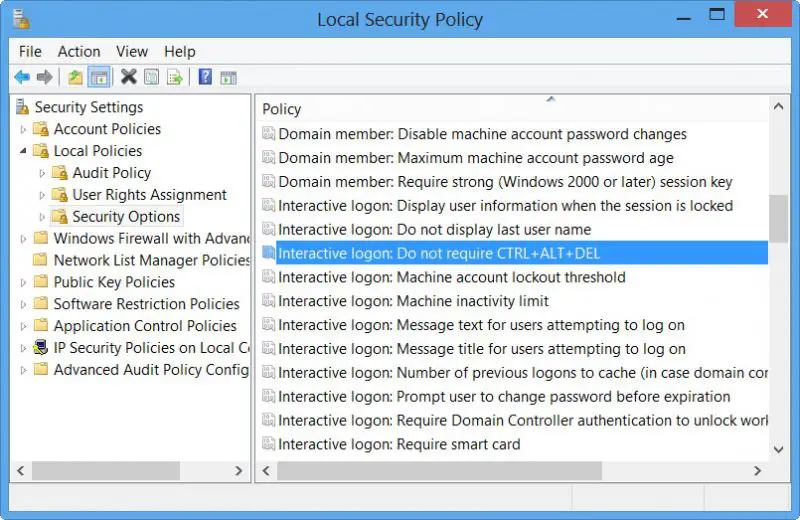
In the left pane, select Local Policies > Security Options. Now in the right pane, double click on Interactive logon: Do not require CTRL+ALT+DEL.
This security setting determines whether pressing CTRL+ALT+DEL is required before a user can log on. If this policy is enabled on a computer, a user is not required to press CTRL+ALT+DEL to log on. Not having to press CTRL+ALT+DEL leaves users susceptible to attacks that attempt to intercept the users’ passwords. Requiring CTRL+ALT+DEL before users log on ensures that users are communicating by means of a trusted path when entering their passwords. If this policy is disabled, any user is required to press CTRL+ALT+DEL before logging on to Windows.
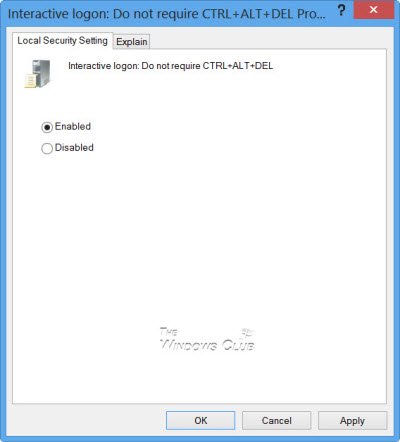
Enable or Disable the policy as per your requirement, click Apply/OK and Exit.
By default, the policy is enabled on Windows 11/10/8 domain-computers, and disabled on Windows 7 or earlier. The policy is enabled by default on stand-alone computers.
Disable Secure Logon using Registry
Open Registry Editor and navigate to the following key:
HKEY_LOCAL_MACHINE\SOFTWARE\Microsoft\Windows NT\CurrentVersion\Winlogon
In the right pane, right-click on DisableCAD and click on Modify.
- To Disable Secure Logon, type 1.
- To Enable Secure Logon, type 0.
You can also change the Ctrl+Alt+Del Screen options using Group Policy or Registry.
I hope this post helped.