
This post will show you how to enable or disable right-click context menu in Internet Explorer 11 in Windows 10. There may be the reason why you may want to disable the context menu – or if you find that the IE context menu is disabled, you can re-enable it using the procedure mentioned in this post.
Enable or Disable Context Menu in Internet Explorer
Using Registry Editor
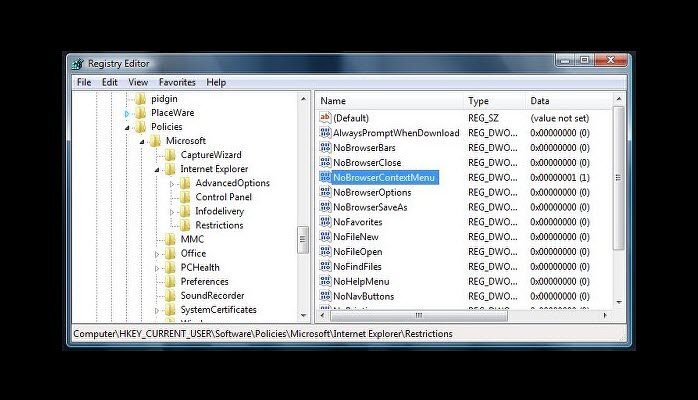
Open regedit and navigate to the following key:
HKEY_CURRENT_USER\Software\Policies\Microsoft\Internet Explorer\Restrictions
Check the value of NoBrowserContextMenu. It should be set at 1, if you want to disable the context menu, and set at o, if you want the context menu to be enabled.
Right-click on NoBrowserContextMenu and select Modify. Here change its value as per your requirement. Click OK
Do the same in the following key:
HKEY_LOCAL_MACHINE\Software\Policies\Microsoft\Internet Explorer\Restrictions
Reboot.
Using Group Policy Editor
Run gpedit.msc and hit Enter to open the Group Policy Editor.
Navigate to the User Configuration > Administrative Templates > Windows Components > Internet Explorer > Browser menus setting.
In the right-side pane, double-click on Disable Context menu.
Select Configured to disable the context menu in Internet Explorer.
Hope this helps.
Also read: How to enable or disable right-click context menus in File Explorer.

