
Most of us enjoy displaying our favorite Desktop Background or Wallpaper on our Windows Desktop. But, if you find for some reason that you cannot change the desktop background or wallpaper in Windows 11/10, you may try some of these troubleshooting steps.
Cannot change Wallpaper in Windows 11/10
Before you begin, please check if you have installed and third-party customization software and if it is restricting you from changing the desktop background. If so uninstall it and restart your Windows PC. Here are a few other things that you need to check:
- Check Accessibility setting
- Check Power Options
- Reset wallpaper cache
- Check Registry setting
- Check Group Policy.
1] Check Accessibility setting
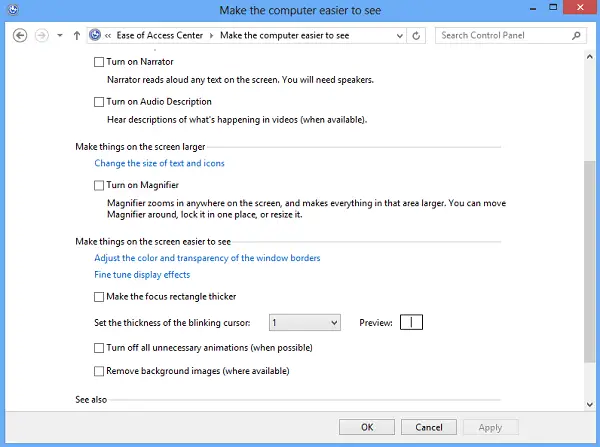
Open Control Panel and select the ‘Ease of Access’ Center. Then, click on ‘Optimize Visual display’ link. Scroll down until you find ‘Make the computer easier to see’ section. Once found, make sure that Remove background images (where available) is unchecked. Save, Apply, Exit.
This should help!
2] Check Power Options
Open your Power Setting in Control Panel. Open Power Options > Select your power plan > Change plan settings > Change advanced power settings > Expand the Desktop background settings option > Expand Slide show.
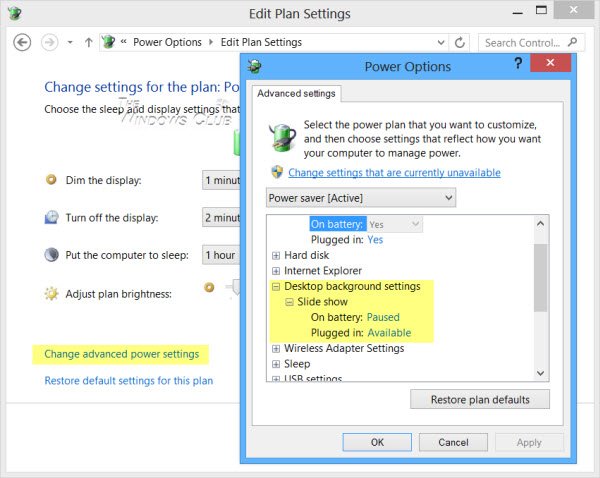
Ensure that the Plugged in option is set to Available.
3] Reset wallpaper cache
If the above option too fails, maybe your TranscodedWallpaper.jpg file has become corrupted.
Open explorer and type the following in the address bar and hit Enter:
%USERPROFILE%\AppData\Roaming\Microsoft\Windows\Themes\
Here, rename TranscodedWallpaper.jpg to TranscodedWallpaper.old.
Next, double-click slideshow.ini file and open it with Notepad. Empty its contents. That is, select all the text and delete it. Save the changes. Close explorer windows.
4] Check Registry setting
If not, try this. Run regedit and navigate to the following key in the Registry Editor:
HKEY_LOCAL_MACHINE\Software\Microsoft\Windows\CurrentVersion\Policies
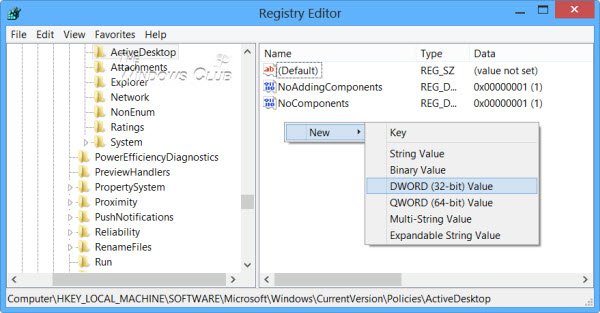
Right-click on Policies > New > KEY > name it as ActiveDesktop.
Next in the right side, right-click > New > DWORD > name it as NoChangingWallPaper.
The DWORD value 1 will restrict change in desktop wallpaper. To allow change give it value as 0.
Reboot.
5] Check Group Policy
Alternatively, you could open the Group Policy Editor, by typing gpedit.msc in Run box and hitting Enter.
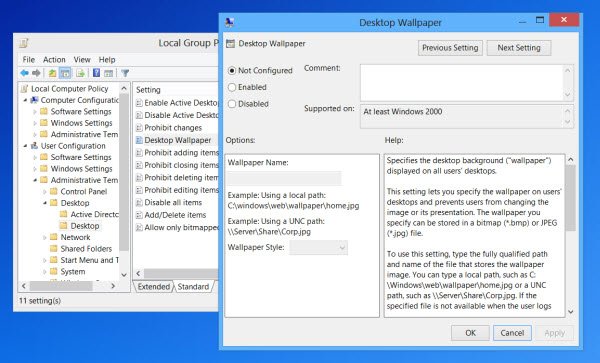
Navigate to User Configuration > Administrative Templates > Desktop. Click Desktop again. Double-click Desktop Wallpaper.
Ensure that the Not Configured option is selected. This will enable the option to change the desktop background.
Read: Desktop Background Group Policy is not applying.
I hope something helps!
See this post if you want to prevent users from changing the Screensaver.

