
You can make a computer dual boot or multi-boot by installing multiple operating systems on it in different hard drive partitions. For example, you can make your computer dual-boot with different versions of Windows OS, say Windows 10 and Windows 11. In this case, your PC displays all the installed operating systems on the boot menu screen. However, if the Windows OS entry is missing from the Boot Menu in a multi-boot computer, this article will help you fix that.
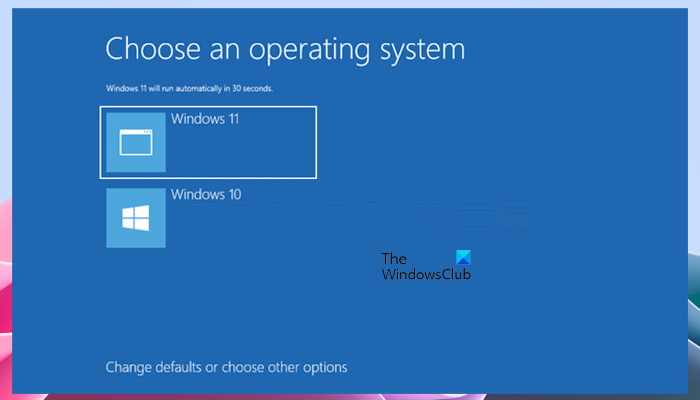
Installed Windows entry missing from Boot Menu Options
If after you install an earlier version of Windows on a computer that already has a newer version of Windows, you may find that the name or entry for the newer version of Windows may be missing from the startup options or boot menu in the dual-boot computer. Here, we will see what you can do if the Windows OS entry is missing from the Boot Menu in a multi-boot computer.
Let us say as an example, if you install Windows 11 on a PC where Windows 10 is already installed, the Windows 11 boot menu incorporates the options from the older OS’s boot menu.
But, on the other hand, if you have installed Windows 10 on a Windows 11 machine, in the Boot Menu, you may no longer be able to see Windows 11 as an option. This occurs because when a different version of Windows is installed, it rewrites the MBR to call its own boot loader. It will overwrite the MBR with one that does not recognize the newer Windows Boot Loader.
You can resolve this issue, as follows. Boot into the older Windows version, whose name or entry appears and open an elevated command prompt window. Type the following and hit Enter:
Run <D>:\Boot\ Bootsect.exe –NT60 All
Where <D> is the Drive letter. Reboot.
You will now be able to see the menu option/s for the newer version of Windows.
Now To restore the entry for the older version, open an elevated command prompt, type the following and hit Enter:
Bcdedit –create {ntldr} –d “Put Description of Menu here”
Restart Computer.
That’s it. I hope this helps.
How do I show OS selection menu in multiboot?
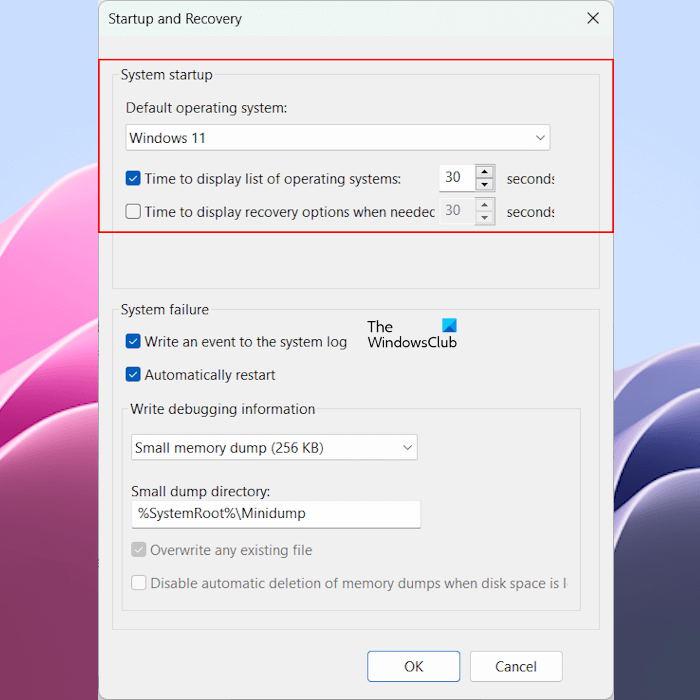
If you have a dual-boot computer, you can easily make your system show the OS selection menu on the boot screen. For this, open your WIndows 11/10 Settings and go to System > About. Now, click on the Advanced system settings option. Under the Advanced tab, click Settings under the System and Recovery section. Select the Time to display list of operating systems checkbox and enter the time in seconds there. Click OK to save the changes.
Why is Windows not showing in boot menu?
If you have a dual-boot computer, it displays the list of operating systems installed on your computer in the Boot Menu for 30 seconds, which is the default time. After that, your computer will boot into the default operating system. You can change this default operating system time in the Advanced System Settings. If this time is not set, your computer will not show the list of operating systems in the Boot Menu and boot directly into the default operating system.
Related: Choose an operating system screen or Dual boot menu missing.


