
Windows File Explorer is a program that is very integral to Windows operations. Here, you see different files, folders displayed in a hierarchy. The program lets you easily copy, move, rename, and search for files and folders. For example, you can open a folder that contains a file you want to copy or move, and then drag the file to another folder or drive. File Explorer is a File manager. It finds immense use in daily operations, ranging from opening files to transferring them to a different location such as a USB drive.
The Explorer is divided into the following areas:
- Navigation Pane – Seen on the left-hand side, the navigation pane lists all the folders, library items and network connections
- Details Pane – provides details such as creation& modification date, size, etc. about files selected in the explorer.
- Preview Pane – The Preview pane gives a sneak preview of media and document files.
Explorer Navigation Pane missing in Windows 11/10
Sometimes, your Windows Explorer may not display the left-side Navigation Pane or Sidebar properly or may appear all grayed out – a possible reason could be file or registry corruption. What do you do under such circumstances? Well, you may try this:
- Run System File Checker
- Re-register the shdocvw.dll file
- Check the Navigation pane setting.
1] Run System File Checker
Run sfc /scannow to run the system file checker.
2] Re-register the shdocvw.dll file
You may need to re-register the shdocvw.dll file which is used by Windows to add some basic file operations. The shdocvw.dll file is a system file that helps perform the navigation, history maintenance, favorites maintenance, HTML parsing, etc. So see if re-registering this dll file helps you resolve the issue.
Open an elevated command prompt, type the following and hit Enter:
regsvr32 /i shdocvw
After the command successfully runs, restart your computer. Your Explorer should now display the left folder pane properly.
3] Check the Navigation pane setting
In Windows 11, to heck, if you have by mistake unchecked the option to show the Navigation Pane, click on View > Show.
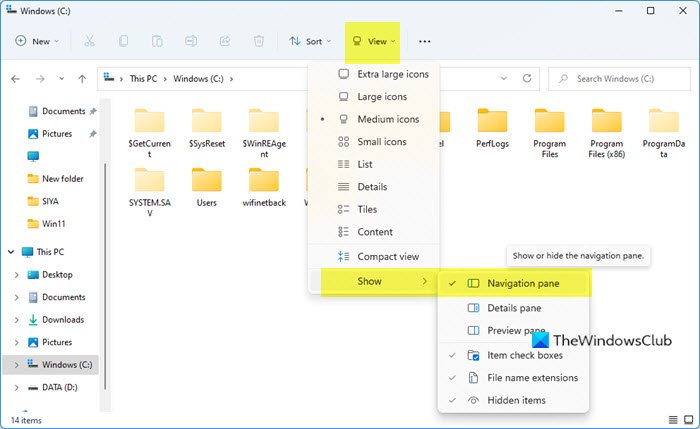
Select Navigation pane there if it is unchecked.
If you are using Windows 10/8, you may want to check if you have by mistake unchecked the option to show the Navigation Pane.
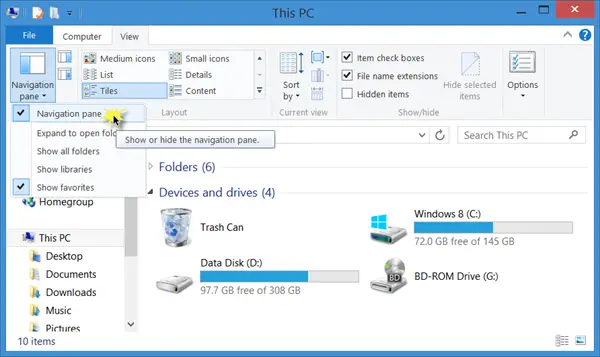
Open File Explorer > View tab > Navigation pane > Ensure that the option to show Navigation pane is checked.
I hope something helps!

