Windows Experience Index or WEI is a feature found in Windows 8, Windows 7 and Windows Vista, that helps rate the performance of key hardware components such as the CPU, disk drive, and graphics card. It helps PC give a score typically between 1.0 and 7.9. The score helps you find a floor model that suits your needs.
Normally, a PC with a score of 2 is typically sufficient for basic computer tasks like web browsing. Graphics–intensive software frequently requires a 3 or higher. As such, WEI plays an important role. If you are unable to update WEI you may try out the following.
Cannot Update Windows Experience Index
When you right-click your Computer and click on Properties, you are taken to a page where, inter alia, your machine WEI is displayed.
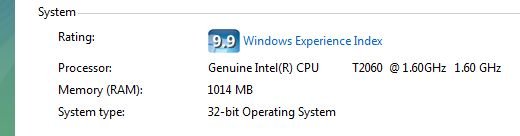
When you click on Windows Experience Index, you are taken to the page, where the detailed scores of each component are displayed.
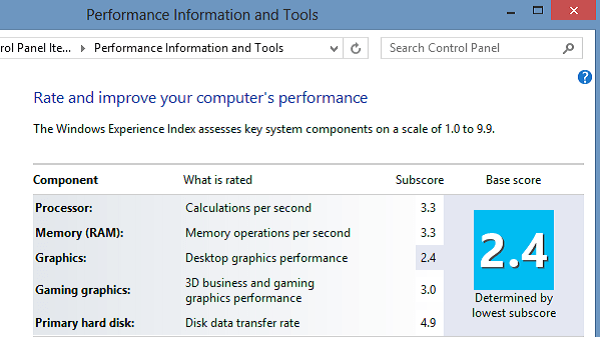
It may happen that you encounter an error or are unable to update your WEI score. Or maybe a figure is shown, but next to it, is mentioned in faded letters:
Windows Experience Index: Unrated
Or even if you are able to click on it and open the ‘Rate and Improve Your Computers Performance‘ window, you find that instead of individual scores, you get a blank window.
Here is what you can try:
Run Regedit and navigate to the following key:
HKEY_CURRENT_USER\ SOFTWARE\ Policies\ Microsoft\ Windows\ Control Panel\ Performance Control Panel
In the RHS pane, ensure that the value of PerfCplEnabled is set to 1
That’s it! Once you have done this reboot your Windows computer to see the results.
Go here to find out how you can reset Windows Experience Index.
Windows 8.1 users may want to see this post on Windows Experience Index on Windows 8.1.