
In earlier days, the browser could actually let websites silently read the data stored in the Windows Clipboard. However, Microsoft finally addressed this security hole which allowed malicious websites to read and steal your clipboard data.
By default, in Microsoft Edge, if a website tries to steal your clipboard data, you will see the following Prompt.
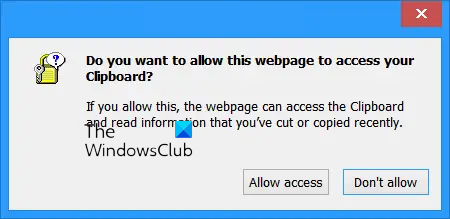
Do you want this webpage to access your Clipboard
To illustrate this issue, simply Copy any part of the text from this web page or anywhere else and visit this demo website.
Your browser will throw up the prompt: Do you want this webpage to access your Clipboard? You should normally, of course, select Don’t allow.
But if you select Allow access, you will see your clipboard data displayed there.
The text you last copied for pasting can be easily stolen by malicious websites using a combination of JavaScript and ASP or PHP or CGI, to write your possible sensitive data to a database on another server.
Clipboard Data Theft – Harden Security
To avoid the prompt, and directly prevent websites access to your Clipboard data, you can harden your security as follows:
Open Internet Options > Security tab > Custom Level button > Security Settings > Under Scripting > Allow Programmatic clipboard access.
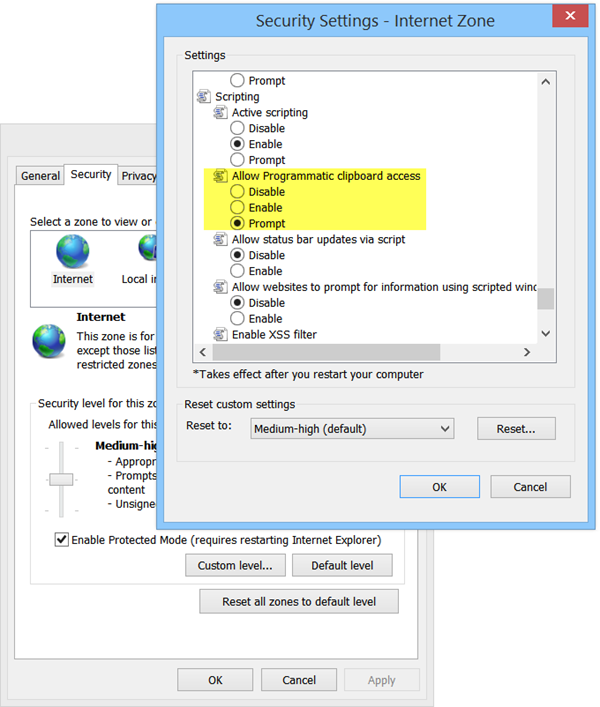
Select Disable, instead of the default Prompt. Click Apply > OK.
The default is Prompt, so a Prompt is expected to be thrown at you. But if you want to be absolutely safe, you may Disable it and simply disallow clipboard access. This will ensure the safety of the contents of your clipboard, always, as there will be a no question of your even pressing on the wrong – Allow access – button, by mistake.
You can also change Clipboard permissions via Edge settings as follows:
Copy-paste the following address in Edge’s address bar and hit Enter:
edge://settings/content/clipboard
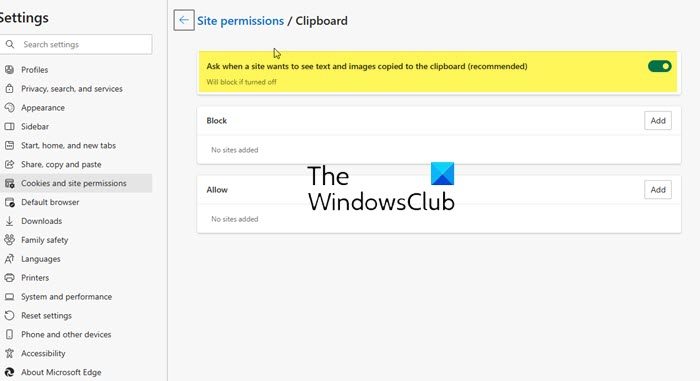
When Clipboard permissions page opens, you can toggle On or Off the Ask when a site wants to see text and images copied to the clipboard (recommended) setting, as per your need. You can also Block or Allow sites here.
TIP: You may also like to check out some good free password manager like freeware KeePass. Keepass provides an option to clear the clipboard after a user-specified number of seconds, as well as an enhanced mode that allows copy-pasting only one time. Otherwise, you can clear clipboard memory manually, as and when necessary.
Now read – What is Pastejacking?

