
Data Execution Prevention, or DEP, is a security feature that can help prevent damage to your computer from viruses and other security threats. DEP can help protect your computer by monitoring programs to make sure they use system memory safely. It is present in Windows Server and Windows 11/10/Server. If a program tries running (also known as executing) code from memory in an incorrect way, DEP closes the program.
What is Data Execution Prevention or DEP
Here are answers to some common questions about Data Execution Prevention (DEP), sourced from Microsoft Help.
Which programs does DEP monitor?
DEP automatically monitors essential Windows programs and services. You can increase your protection by having DEP monitor all programs. To increase DEP protection, see Change Data Execution Prevention settings.
Is it safe to run a program again if DEP has closed it?
Yes, but only if you keep their DEP turned on for that program so that Windows can continue to detect attempts to run code from protected memory locations and help prevent attacks.
If DEP keeps closing the same program, is my computer under attack?
If you use the recommended security settings and your antivirus software does not detect a threat, your computer is probably not under attack. In this case, the program might not run correctly when DEP is turned on. Before you change any DEP settings, check for a DEP-compatible version of the program or an update from the software publisher.
How can I prevent DEP from closing a program I trust?
First, see if a DEP-compatible version of the program is available by visiting the software publisher’s website. If the publisher has not released an updated, DEP-compatible version of the program, you can turn off DEP for the closed program.
You can use the program, but it might be vulnerable to an attack that could spread to your other programs and files.
If you turn off DEP for a program, it’s a good idea to check frequently for an updated version and turn it on again after you update it. To turn off DEP for a program, see Change Data Execution Prevention settings.
What should I do if DEP is closing a program that’s part of Windows, such as svchost.exe or explorer.exe?
The svchost.exe and explorer.exe programs are parts of the Windows operating system. If DEP closes them or other Windows services, the cause could be smaller programs, such as extensions, that are created by other software publishers and that operate inside Windows.
If you recently installed a program and notice DEP closing Windows-based programs, check with the software publisher to see if an updated, DEP-compatible version is available, or try uninstalling the program.
If my DEP settings indicate that my computer’s processor does not support hardware-based DEP, am I still protected?
Yes. DEP is a software-based feature of Windows. Some computer processors also provide hardware-based DEP under various names. These processors use hardware technology to prevent programs from running code in protected memory locations. If your processor does not support hardware-based DEP, Windows will use software-based DEP to help protect your computer.
You can still turn off DEP for individual programs if you protect all programs. If you suspect that a program does not run correctly when DEP is turned on, check for a DEP-compatible version of the program or an update from the software publisher before you change any DEP settings.
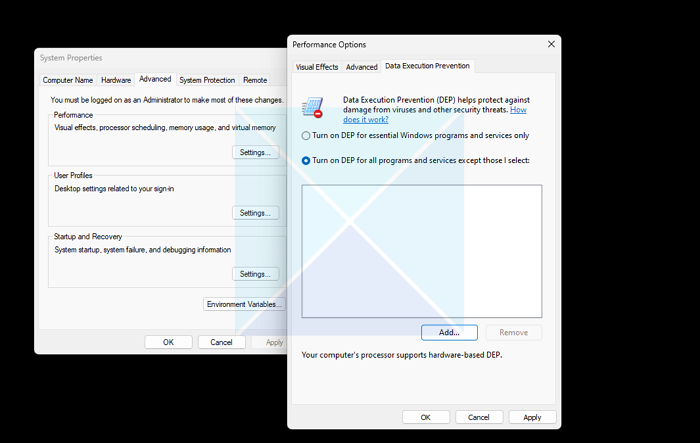
- Open System properties
- Switch to the Advanced tab, then click the Settings button under Performance.
- Switch to Data Execution Prevention; you can turn it on here and add programs.
Read:

Windows 7 home premium just recently updated (I guess it’s been asking to update for a week) and i finally updated it today. Since then every program I’ve tried to open except chrome & vlc media player has given me the “Has stopped working” error. So far I’ve managed to isolate that the problem is because of DEP. and although i tried to add programs individually to the DEP exclusion table, nothing would accept. The only possible solution I’ve found that works for now is either doing a system restore or in cmd.exe with admin settings using “bcdexit.exe /sex nx AlwaysOff”. Is there another way to fix the problem without disabling DEP entirely?
My post on “Turn Off or On Data Execution Prevention (DEP) for Individual Programs” has been scheduled to appear tomorrow. Hopefully its should help you.
i run administrator put On DEP , restart and it still off ?! any advice i am using w7 ultimate