
One of the stunning changes in Windows Vista (and Windows 7) is the Games Explorer, targeted at gamers. From the Start menu click on the GAMES folder. You will get a cool new gaming interface called the Games Explorer. All the games on the Windows computer have been put together here in one place.
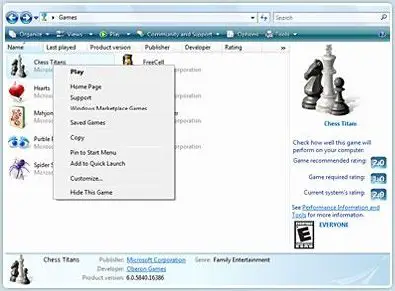
Games Explorer in Windows 7 and Vista
Right-click a game’s icon and you get easy access to a menu of play tasks and online options, such as linking to the game’s website.
At the bottom of the window, you get all the details of the game. It will include information like when it was developed, when was it played, publisher, etc.
In the right pane, you can see the game requirements and the systems ratings. This is really useful info that can tell you instantly how well the game will be played on your system.
On the top, apart from other buttons, is instant access to ‘Parental Controls‘ here one can determine how long and when all and which particular game/s users and kids can play.
Using the Games Explorer command bar, you can easily access any game-related settings for your software or hardware. You can drag the shortcuts of games installed in some other folder here too.
If on running a game from the Games Explorer, you get an error message, you might want to see this post on Troubleshooting Games Explorer. Go here if you find that your Games Explorer is slow to open in Windows 7.
UPDATE
Games Explorer in Windows 8
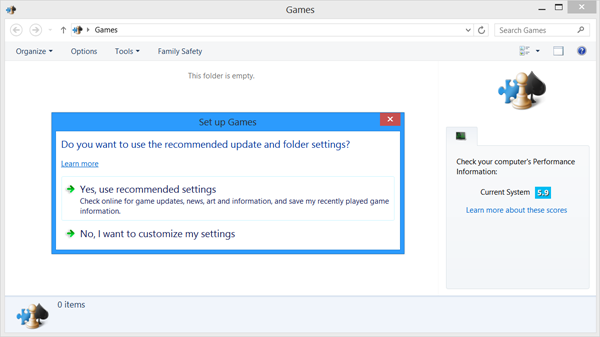
You won’t find Games Explorer in Windows 8 or Windows 8.1. It has been deprecated. Now instead of the classic Microsoft Games like Free Cell, Hearts, Minesweeper, Freeball, Solitaire, Spider Solitaire, Chess Titans, Purble Place, Inkball, Windows 8 comes with Xbox games. A shortcut to open these Xbox Games —Games— is available on the Start Screen.
But if you still want to, just for the heck of it, open the Games Explorer in Windows 8, open Run box, type shell:games and hit Enter.
Not that there is much you can do later on! ;)

