In this post, we will see where is the Action Center in Windows 10 and how to open and use the Windows 10 Action Center. In this complete guide, learn how to use Windows 10 Action Center, including opening it and customizing notification settings to your needs. The post also suggests a few troubleshooting steps you may try if you find that the Windows 10 Action Center won’t open or is not working.
The new Notification & Action Center in Windows 10 looks great. The Action Center is split into two major sections – Notifications and Quick Actions and lets you take a look at all the notifications from all different apps and even the system.
Windows 10 Action Center: How to Open, Use & Customize It
If you are on the latest version of Windows 10, you will find it in the extreme right corner of your taskbar. Click on the icon to open the Action Center panel.
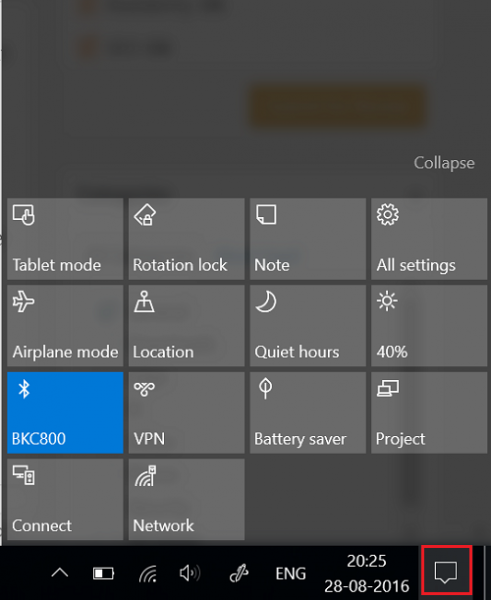
Here in the top end, you see the notifications, but it is at the bottom end that you can see the shortcuts, which the Action Center houses. Most of these are actually shortcuts to frequently used settings. By choosing any of them, you open the relevant Settings section.
Although the Action Center comes across as a simple tool, it is beneficial. It stores and retains important notifications for viewing at a later time. Since Notifications are an important feature that defines the Action Center, it is essential to have this feature enabled all the time.
However, things can get irritating when you receive a barrage of notifications. If required, you can set the priority of Notifications or disable notifications. To do so, click the Action Center icon located on the right-hand side of the Windows taskbar.
Next, click the All Settings button, chose System and then, Notifications & Actions.
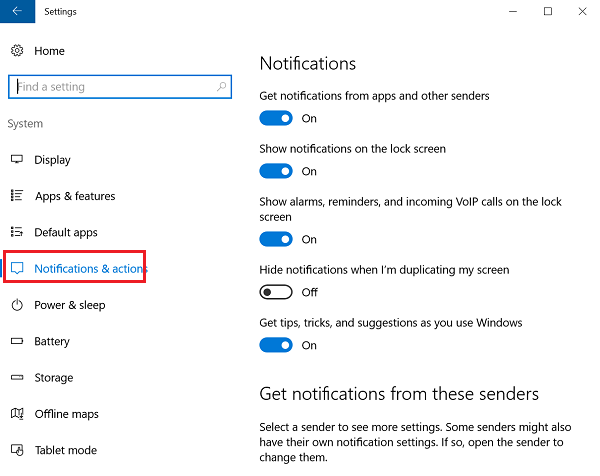
Toggle switches to ‘On’ or ‘Off’ for different app settings.
Quick Actions
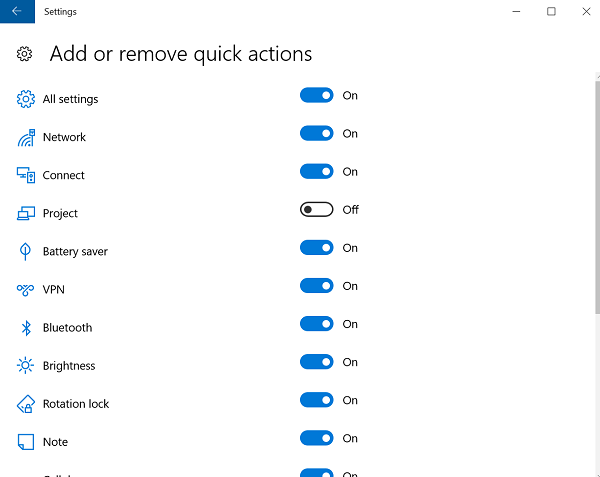
In addition to notifications, Windows 10 puts the’ Quick Actions‘ in the Action Center. It enables you to switch ‘Tablet Mode‘ quickly and access other settings such as ‘Display’. To choose which Quick Actions appear at the bottom of your computer screen, hit the Action Center icon and select ‘All Settings’.
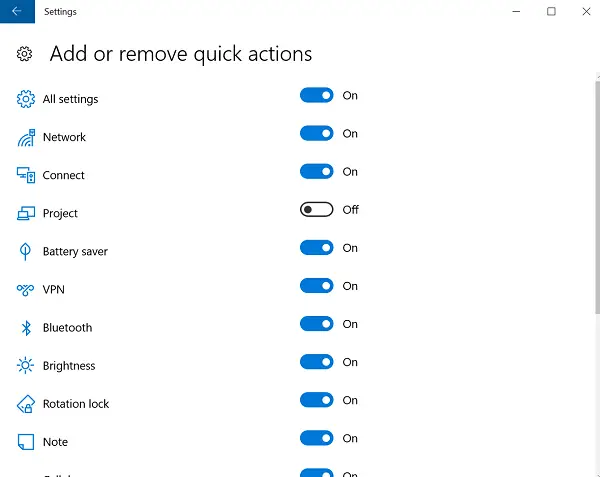
After that, select System > Notifications & actions and finally, the ‘Add or Remove Quick Actions’ link.
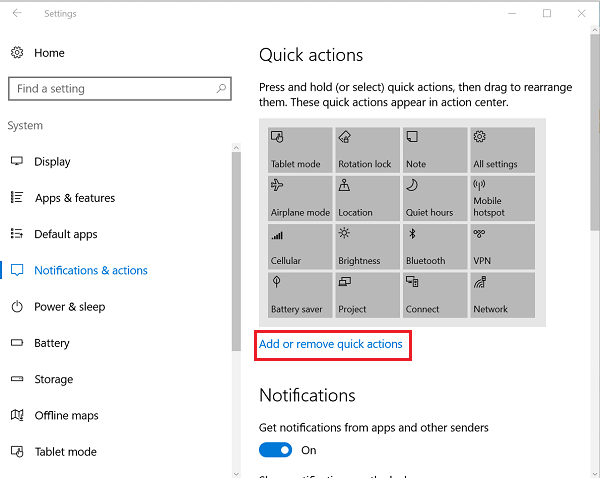
Here, you can select which quick action should appear under Action Center and when done, close the window to apply the changes.
Dismiss Notifications
Cluttering in the Action Center due to the display of many notifications can be minimized to a great extent by dismissing them. To dismiss individual notifications, hit the Action Center icon on the taskbar and hover your mouse cursor over the notification you’d like to dismiss. Then, click the “X” button to dismiss the notification. The array of notifications can be from any app or Windows settings. It includes birthday notifications, constant pop-up notifications, Content of Notifications, current notifications, displays notifications.
I hope this familiarizes you with the Windows 10 Action Center.
See these posts if your Action Center does not open or is missing. If you do not use this feature, then this post will show you how to disable Notification and Action Center in Windows 10.
What Are the Major Settings in Action Center?
There are three—Notifications for all apps, Focus Assist, and individual notifications. While the first and last control the amount of notification that can be shown, Focus Assist allows you to prioritize which apps can send notifications making sure you are not distracted while you work.
How Do I Change the Action Tiles?
Go to Windows 10 Settings > System > Notifications & Actions. Here you can choose to rearrange and add more. In Windows 11, you can click on any of the system icons and then click on the pencil icon to bring the action center into edit mode. Now you can either change the order or click Add More if anything is missing. The screen brightness bar will automatically help you understand that you are at the right place.
How Do I Turn Off Windows Action Center Notifications?
You can either turn off all notifications or from specific apps. Right-click on the corner of Taskbar, and then click on Notification settings. Here you can toggle next to the Notifications option. The other option is to look at the list of apps and toggle off the ones that are the most distracting.
How To Disable Windows Action Center Completely
While you can turn off the notifications, the best way to disable the Windows Action Center is to use Focus Assist and set it to Alarms only. Go to Settings > System Focus assist and change the choice, i.e., Notifications from Apps. However, you cannot remove it from the Taskbar.
Receive Important Action Center Notifications
If you only want to get the most important notifications, you can set them in Action Center settings or System > Focus Assist.
Select Priority only, and then click on Customize priority list. Here you can including calls including VoIP, reminders, people, and add apps. These notifications will appear on the lock screen as well.
These links may also interest some of you: