
In this guide, we are going to discuss some hidden and interesting features in Windows 11 that you might not have known of. Microsoft keeps rolling out new features every month with new updates and patches. With the new OS, there have been a lot of improvements and new features in Windows 11 like Snap Layouts, a new Microsoft Store, a redesigned Start menu and taskbar, and many more.
Windows 11 hidden features
While you must have noticed and used many of these features as per your requirement in Windows 11, there are some features that might have gone unnoticed by you. Some of these features existed in earlier Windows versions too – but they have now been improved upon. These features can actually help you improve your overall Windows experience. Let us check out this list of hidden features in Windows 11.
- Multitasking features
- Adjust volume for individual apps opened on desktop
- Windows Backup options
- Background apps permission
- Some interesting clipboard history features
- Better security
- Estimated “Time to update”
- Device Usage
- Focus mode within the clock app
- Windows Subsystem for Linux.
If you are a beginner, you may want to go through our Windows 11 Tutorial first.
1] Multitasking features
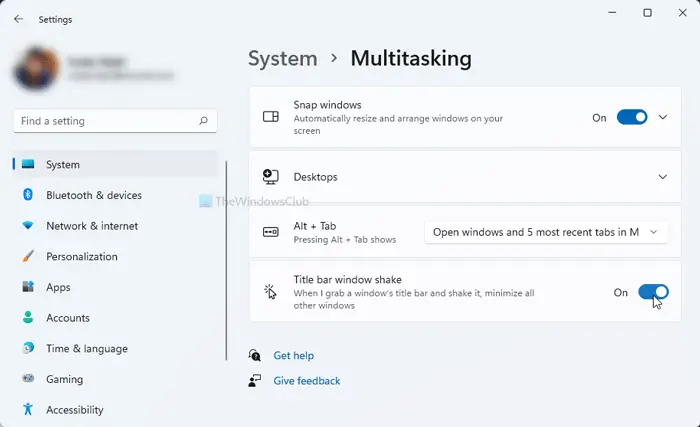
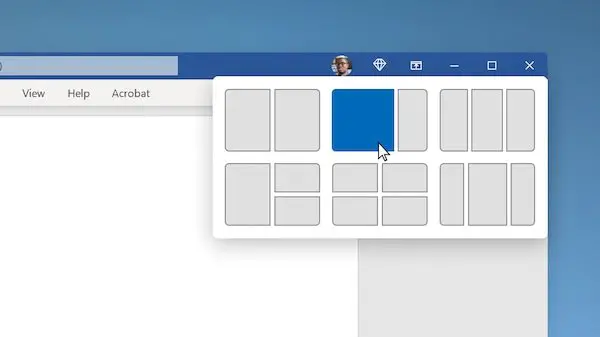
Windows 11 has some improvements in its multitasking features. We have already talked about the Snap Layouts feature that allows you to handle multiple Windows at a time. Apart from this, you can also show browser tabs in the Alt+Tab menu.
You can choose if you want to open windows and all tabs in Microsoft Edge, open windows and some recent tabs in Microsoft Edge, or open windows only.
Apart from this, there is a Title bar window shake (Aero Shake) feature using which you can grab a window’s title bar and shake it to minimize all other opened windows on your desktop.
To use these features, open the Settings app by pressing Windows+I hotkey and then navigate to the System > Multitasking section.
Read: How to get the old Right-click Context Menu back on Windows 11.
2] Adjust volume for individual apps opened on desktop
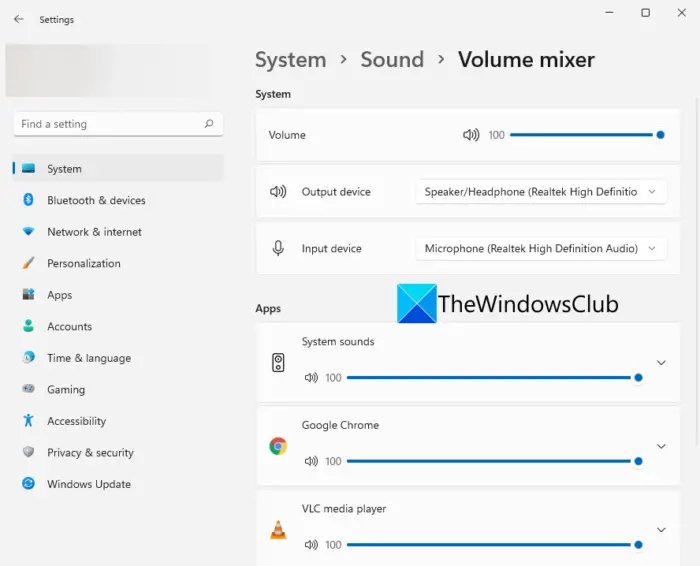
The Volume Mixer feature in Windows is now available in the Settings > System > Sound section. It is the same feature that enables you to adjust system sound levels. However, if you didn’t know, you can now adjust the volume on an individual app basis.
Simply open Settings and go to System > Sound and click on Volume Mixer. After that, under the Apps section, you can see the volume slider for individual apps that you have currently opened. You will now be able to adjust the volume for each app as you want.
Read: How to install the hidden Aero Lite theme in Windows 11.
3] Windows Backup options
In the new Settings app on Windows 11, you will see a new Windows Backup options page. You can find the backup options under Settings > System > Storage > Advanced storage settings > Backup options. You can directly sync your folders to OneDrive. Plus, you can also use handy features like Remember my apps and Remember my preferences.
Read: Windows 11 Accessibility Settings and Features.
4] Background apps permission
You can also select the background apps that can use certain permissions on your Windows 11 PC. These permissions may include Location, Camera, Voice activation, Microphone, Contacts, Calendar, etc. For setting background apps permissions, go to Settings > Privacy & security and scroll down to the App permissions section. You can choose certain permission and then enable/ disable the permission for specific apps.
Read: How to Add Folders to Windows 11 Start Menu.
5] Some interesting clipboard history features
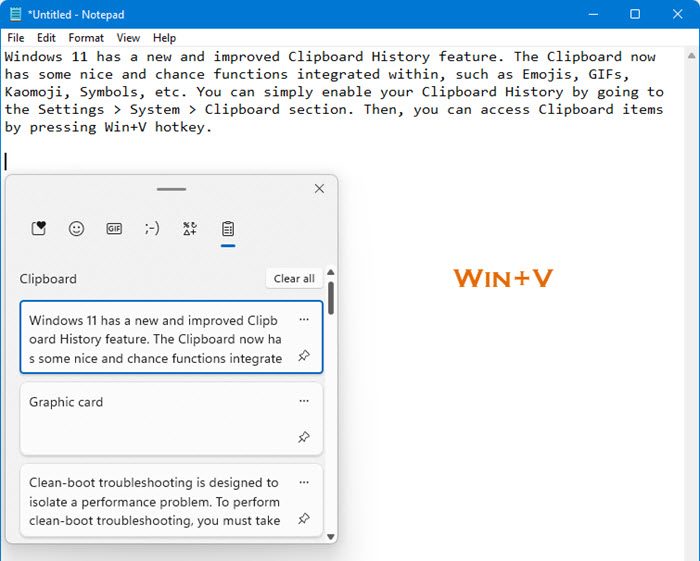
Windows 11 has a new and improved Clipboard History feature. The Clipboard now has some nice and chance functions integrated within, such as Emojis, GIFs, Kaomoji, Symbols, etc. You can simply enable your Clipboard History by going to the Settings > System > Clipboard section. Then, you can access Clipboard items by pressing Win+V hotkey.
In the Clipboard History window, you will see several integrated features like GIFs, Emojis, etc. You can use these items in your write-ups whenever you want.
Read: Windows 11 Keyboard shortcuts you should know.
6] Better security
Since the news of Windows 11 OS has come out, we all have been hearing how Windows 11 has greater built-in security requirements including secured core PCs and TPM. There are various handy Privacy and security settings in Windows 11 that help you secure your PC. Some of these features include secure sign-in options, Smart App Control, Device Security features, built-in security tools and features, data encryption, app launch tracking function, feature to log out when you’re away, and many more. These options make sure that you have a great Windows 11 experience without compromising on security.
Read: Windows 11 File Explorer Tips and Tricks.
7] Estimated “Time to update”
Windows 11 will now estimate that how much time will be required to install certain updates on your PC. Although we can’t test how accurate the estimated update time is, it still can give you an idea of how long an update will take to install. So, you know whether you can update your PC instantly or wait for active hours to finish. You can also schedule the update after active hours.
This feature is expected to roll out soon as new updates in Windows 11 unfold.
Read: How to move Taskbar to the Top on Windows 11.
8] Device Usage
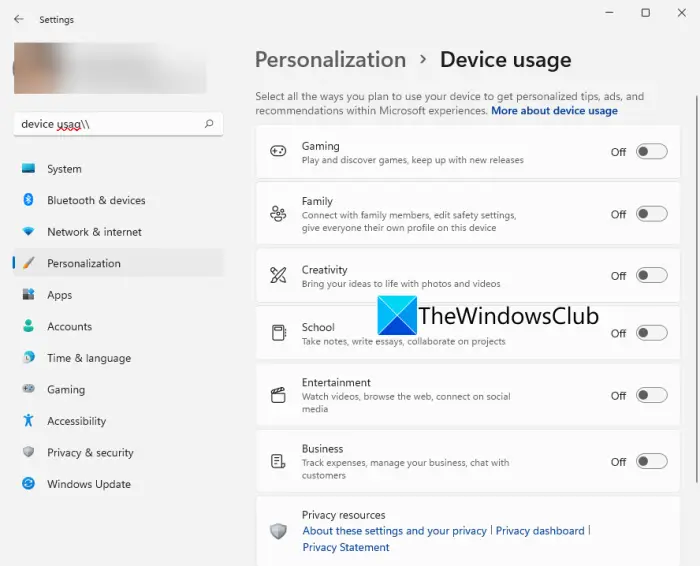
Device usage is a small but effective feature. In case you didn’t know, it allows you to tell the system how you plan to use it to get personalized tips and recommendations. You can select more than one use cases for your device that may include Gaming, Family, Creativity, Business, Entertainment, etc. You can access this setting by going to Settings > Personalization > Data usage.
Read: How to change Language, Time, Date, Region in Windows 11?
9] Focus mode within the Clock app
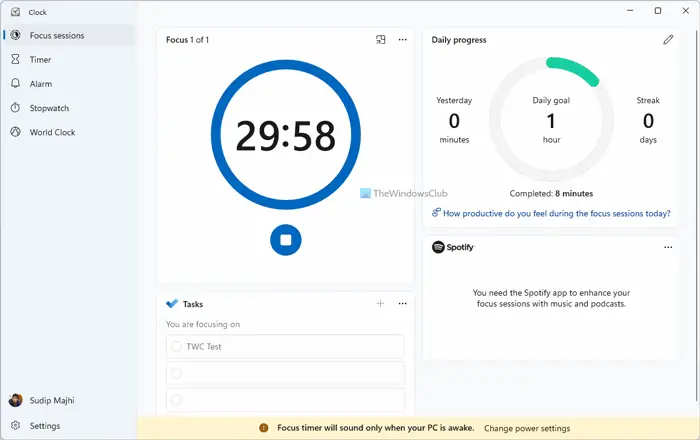
The new Clock app in Windows 11 comes with a Focus Session mode. This mode enables users to focus on their work, monitor time spent on a particular task, take a break from work after a time interval, and more. If you are are workaholic, you can make use of the feature to enhance your productivity.
Read: Improve Windows 11 Performance by tweaking these 5 settings.
10] Windows Subsystem for Linux
The Windows Subsystem for Linux (WSL) in Windows 11 lets the developers run a GNU/Linux environment and explore the Linux OS. WSL is now available in the Microsoft Store from where you can get it.
What are the new Windows 10 Tips and Tricks?
In this post, we have covered some simple and some not so simple Windows 11 Tips and Tricks to improve your computing & browsing experience and increase your productivity.
- Use Desktop Stickers in Windows 11
- Pin apps to the Start Menu
- Dictation with punctuation
- Sound Settings
- Snap layouts
- Taskbar on all your displays
- Adjust taskbar alignment
- Reset network settings
- Turn off notifications
- Remove unwanted personalized ads on apps
- Block pop-ups and tracking in MS Edge
- New options in right-click
- Widgets
- Touch keyboard
- Change the default location
- Search settings.
Must read: These small cool one line, lesser-known, yet very useful one-line quick tips & tricks will help you work efficiently with your Windows computer.
What can Windows 11 do?
There are a lot of things that you can do on Windows 11 that you couldn’t previously. You can access snap layouts, manage multiple desktops faster, run android apps directly, check out more stats on Battery Usage. Other than that, you can connect to Microsoft Teams in a few clicks, access & manage widgets from the taskbar, and use Focus mode with the improved Clock app.
Also read: How to use ViVeTool on Windows 11 to enable new hidden features.
Will Control Panel be removed in Windows 11?
The Control Panel might be deprecated in Windows OS eventually. However, as of now, you can access and use the Control Panel in Windows 11 as usual.
Is Windows 10 better than Windows 11?
It totally depends on individuals how they like the new Windows 11. Windows 11 is completely revamped, has a new UI design. While some loved Windows 11, there are many users who prefer the old Windows 10. There are some new features that you get in Windows 11 and it definitely has greater security. However, some users also miss many features that they loved in Windows 10. For the people who still prefer Windows 10, it is here to stay until 2025. So, you can continue using it.
What features are deprecated in Windows 11?
There are many features that have been deprecated or removed in Windows 11 including Cortana, Windows Timeline, Quick Status in Lock Screen, Tablet mode, Math Input Panel, many taskbar features, etc.
That’s it!

