
Check Disk or Chkdsk.exe is a built-in Windows utility used to check for errors in the disk media and in the file system. If you face problems ranging from blue screens, to inability to open or save files or folders, one can run the Check Disk utility. Whenever we need to detect and fix the file system or disk corruption, we run the built-in Windows Check Disk tool. The Check Disk utility or ChkDsk.exe checks file system errors, bad sectors, lost clusters, and so on. Check Disk can run automatically, in the case of an abrupt shutdown or if it finds the file system to be ‘dirty’.
We can say that there are “two versions” of this utility in Windows 11/10. One is the basic version which most of us use and the other is the command-line version, which has more sets of options. The basic version of the Check Disk utility can be accessed as follows:
Open Computer > Right-click Drive > Properties > Tools tab > Check Now.
Here you have options to Automatically Fix File System Errors and Scan For And Attempt Recovery Of Bad Sectors.
You may have to schedule the chkdsk at reboot if the drive to be checked, is in use.
Command Line ChkDsk
And then there is this command-line version of chkdsk, which offers you several options, apart from just allowing you to set up regular disk checking using the Task Scheduler.
To use the command line check disk version, open a Command Prompt using the ‘Run As Administrator’ option. Type chkdsk at the prompt. This will run Chkdsk in a Read-Only mode and display the status of the current drive.
Typing chkdsk /? and hitting Enter will give you its parameters or switches.
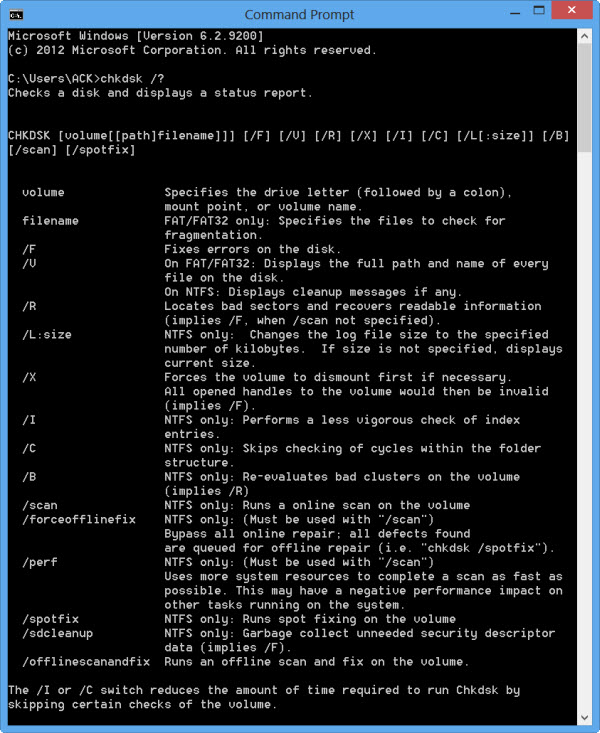
To get a report for, say, drive C, use chkdsk c:.
You can also use the following parameters at the end of the command to specialize its operations.
The following are valid on FAT32 / NTFS volumes.
- /f Fixes errors detected.
- /r Identifies Bad Sectors and attempts recovery of information.
- /v Displays a list of every file in every directory, on FAT32. On NTFS, is displays the cleanup messages.
The following are valid on NTFS volumes only.
- /c Skips the checking of cycles within the folder structure.
- /I Performs a simpler check of index entries.
- /x Forces the volume to dismount. Also invalidates all open file handles. This should be avoided in Desktop Editions of Windows, because of the possibility of data loss/corruption.
- /l[:size] It changes the size of the file that logs NTFS transactions. This option too, like the above one, is intended for server administrators ONLY.
- Do note that, when you boot to the Windows Recovery Environment, Only two switches may be available.
- /p It performs an exhaustive check of the current disk
- /r It repairs possible damage on the current disk.
The following switches work in Windows 11/10, Windows 8 on NTFS volumes only:
- /scan Run online scan
- /forceofflinefix Bypass online repair and queue defects for offline repair. Needs to be used along with /scan.
- /perf Perform the scan as fast as possible.
- /spotfix Perform spot repair in offline mode.
- /offlinescanandfix Run offline scan and perform fixes.
- /sdcclean Garbage collection.
These switches are supported by Windows 11/10 on FAT/FAT32/exFAT volumes only:
- /freeorphanedchains Free up any orphaned cluster chains
- /markclean Mark the volume clean if no corruption is detected.
Also note:
- ChkDsk /f scans for and attempts to repair errors in the file system.
- ChkDsk /r includes /f, but it also scans the entire disk surface for physical errors and attempts to repair them as well.
So you could run a command like the following to check and repair disk errors on your C drive:
chkdsk c: /r
Cancel a CHKDSK scan
To cancel a scheduled check, at a command prompt, type
chkntfs /x d:
and hit Enter. Here d is the drive letter.
Users of Windows 11/10 may have noticed that Disk Error Checking is a bit different from the earlier versions of Windows. Read this post on Disk Error Checking in Windows to learn more.
This post on how to format External Drive or run Check Disk using Command Prompt may interest some of you.

