
The Right Click Menu or the Context Menu is the menu, which appears when you right-click on the desktop or a file or folder in Windows. This menu gives you added functionality by offering you actions you can take with the item. Most programs like to stuff their commands in this menu. While they can be useful, the problem is that even when you uninstall the programs, they fail to remove the respective context menu item, making the menu slow and appear cluttered. Context Menu Editors can help you manage your right-click context menu items in Windows 11/10.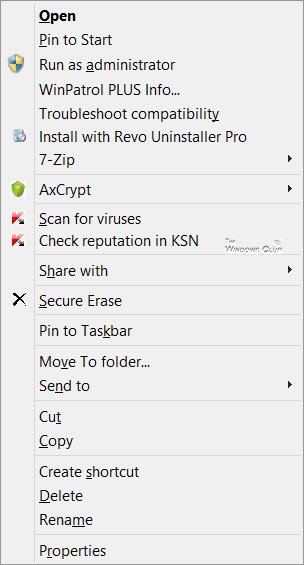
Edit Context Menu in Windows 11/10
If you wish to reduce this clutter or remove items from this menu that are no longer useful, you can do so. Most programs will offer the Explorer integration in their Settings, and if you look around, you may be able to find it and disable the File Explorer context menu integration. If not, you must edit the registry or use third-party freeware.
Using Registry Editor
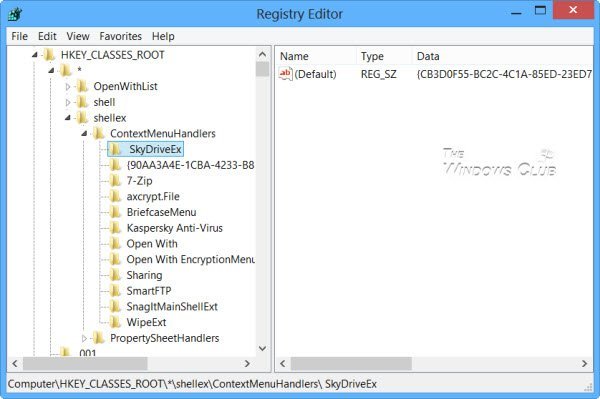
Run regedit to open the Registry Editor and navigate to the following key:
HKEY_CLASSES_ROOT\*\shellex\ContextMenuHandlers
Here, you need to simply delete the keys you don’t want. There are other registry locations too, where this data may be stored.
Context Menu Editors for Windows 11/10
You can also use third-party freeware context menu editors to remove or add or edit context menu items. Go through the list and see which supports your version of Windows OS.
- Ultimate Windows Customizer, Right-Click Extender, Ultimate Windows Tweaker, & Context Menu Editor
- ContextEdit
- ShellExtView or ShellMenuView
- Easy Context Menu
- MenuMaid
- File Menu Tools.
1) Ultimate Windows Customizer, Right-Click Extender, Ultimate Windows Tweaker, & Context Menu Editor
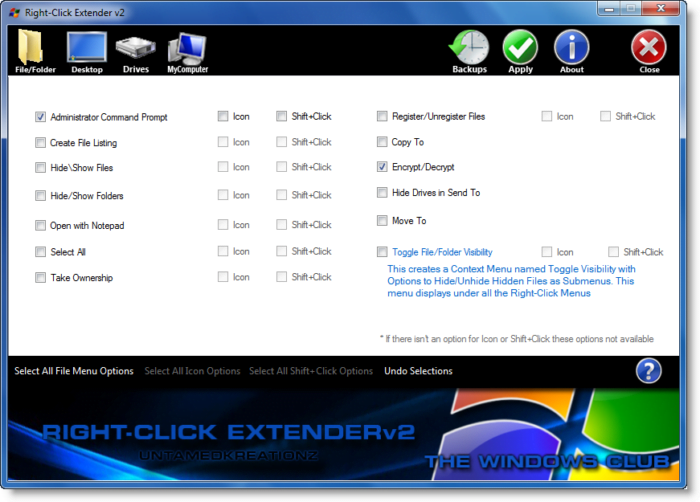
Some of our following freeware like Ultimate Windows Tweaker will help you edit the right-click context menu easily. It is one of the best tools that you can find in the market right now. From adding an option like Create File to Select All, you can add any option in your context menu with the help of this freeware.
Ultimate Windows Customizer, Right-Click Extender , Ultimate Windows Tweaker, and Context Menu Editor are freeware releases from TheWindowsClub, and you may want to check them out. They have been developed for Windows 7 but may work on Windows 11/10 too.
2) ContextEdit
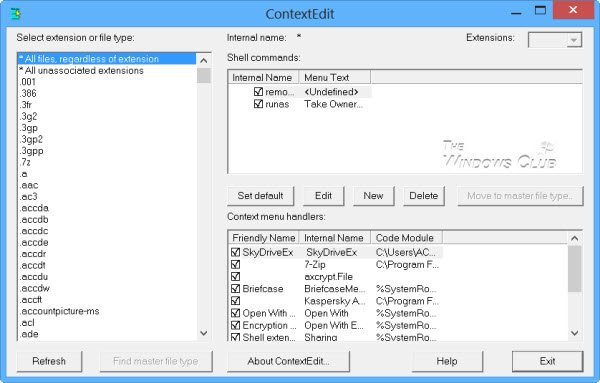
ContextEdit will allow you to easily control the items on your Windows File Explorer context menu.
The context menu often contains submenus with rarely used commands. These commands come from one of two places: shell commands stored within the system Registry or context menu handlers. Get it here.
TIP: You can also remove Rotate Left and Rotate Right from Context Menu for Images.
3) ShellExtView or ShellMenuView
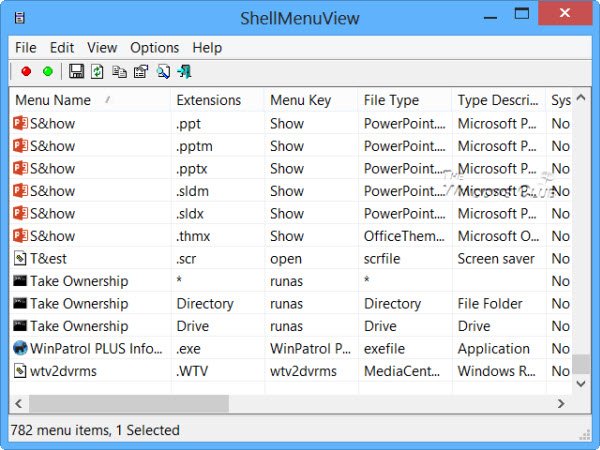
You can also try ShellExtView or ShellMenuView. They are small utilities that display the list of static menu items that appear in the context menu when you right-click a file/folder in Windows Explorer and allow you to easily disable or edit unwanted menu items. The highlight of this tool is that you can show or hide an option by clicking once.
4) Easy Context Menu
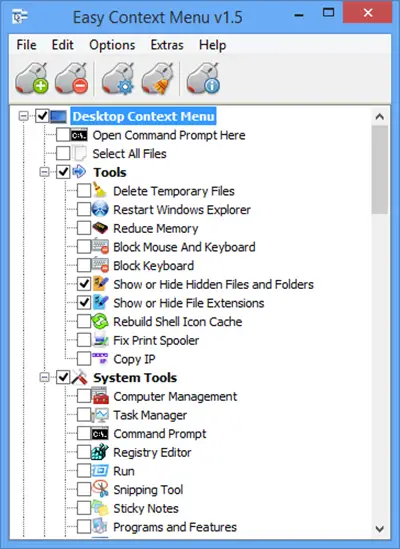
Easy Context Menu freeware will let you add a Program or Icon to the right-click menu. Whether you want to add Command Prompt or Reduce Memory option, it is possible to add all these options using this tool. The best part about this software is that you can insert various System Tools into the context menu, such as Task Manager, Registry Editor, etc.
Read: Nilesoft Free Context Menu Manager for Explorer
5) MenuMaid
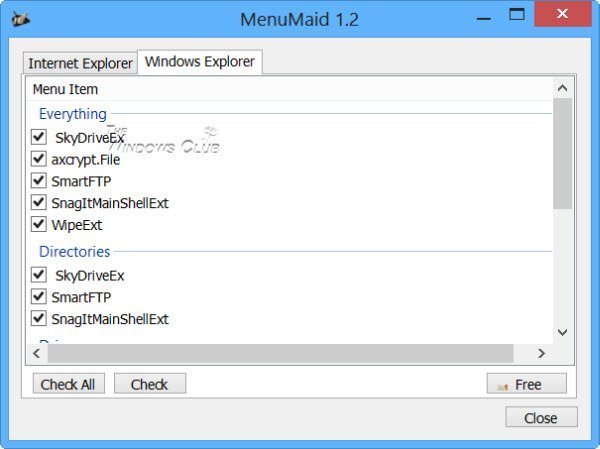
If you are looking for a fast and easy way to clean up your Windows Explorer right-click context menu, try MenuMaid.
Simply download the portable freeware app MenuMaid and uncheck the items you don’t want to appear. Then, if you want to restore them, check them again.
6) File Menu Tools
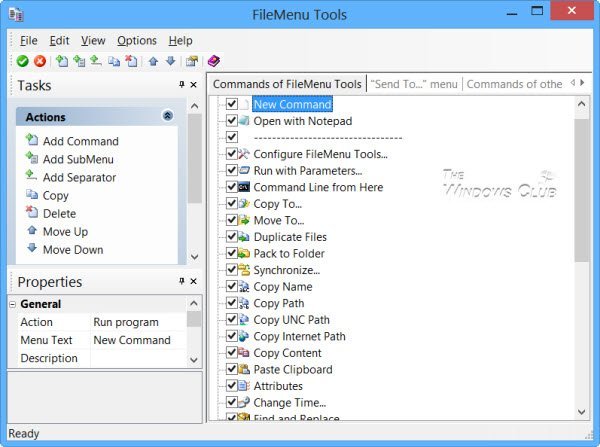
File Menu Tools (link removed) lets you add, delete, and customize the context menu items of Windows Explorer—but according to the comments below, it now comes bundled with a lot of crapware.
It lets configure the following aspects:
- Add some build-in utilities to do operations over files and folders.
- Add customized commands that let you run external applications, copy/move to a specific folder, or delete specific file types.
- Configure the “Sends to…” submenu”.
- Enable/disable the commands which are added by other applications to the context menu and much more!
How do I add a folder to the context menu?
You can use any of the aforementioned software to add a folder to the right-click context menu. Whether you want to add a custom folder or a Library folder, these tools make it possible to do both.
How do I modify a context menu?
To modify a context menu in Windows 11/10, you must use third-party software such as Ultimate Windows Customizer, ContextEdit, etc. These tools help you add or remove items from your existing context menu.
How do I add Excel to the new context menu?
If you use Windows 11, there is no option to add Excel or any other program to the new context menu. However, if you use Windows 10, you could use the aforementioned tools to include Excel in the New context menu. On the other hand, it is possible to use the Registry Editor to add or remove programs, such as Excel, from the context menu.
TIP: Read this post if you want to remove items from the “New” Context Menu.
Do let us know how you manage to keep your Explorer right-click context menu clean and tidy!

How to change “refresh” item in context menu? I have tried all of the software…
The Refresh option cannot be removed or changed as it is not a shell extension, but is hard coded in the operating system.
Just in case you want to read a bit more about what this option does, go here: https://www.thewindowsclub.com/refresh-desktop-folder-windows
Thank you for answering, best regards
wonderful article. very impressive and full of information.keep sharing this kind of knowledge.
Nice article. However, what I was looking for was a way to clean the long list when “new” is selected on the right-click. Every time I install a new program, I get another entry under “new.” The only things I use are “folder” and “shortcut.” I want to get rid of all the other stuff.
TweakUI did that for XP and earlier. The latest version does not have that option. Do you know of a way to clean the “new” listing without having to buy a third party utility?
Check this post: https://www.thewindowsclub.com/remove-items-from-new-context-menu :)
Many items that come up via the right click are not working on one computer. As an example, I open explorer, right click on Network, left click on properties, nothing opens. Windows 7 ultimate 64 bit.
Thank you
gary
how to reduce the size of context menu.. I am using win 8.1…
I’m trying to delete “Shred content with AVG” from AVG antivirus, but there’s no way to remove it without also removing the file scanner. Why wouldn’t AVG simply add an option on the settings? I’m mentioning this because on their forum they refer to this article, so we are basically abandoned to our fate.
I have the issue that there always is an option to undo copy or deletion after I copied a file or folder etc.
How do I switch this off? I might be a little OCD and this just drives me crazy. I always have to move a file to the bin just to restore it so the option disappears. Please help.
Be careful with no 4 – File Menu Tools. It adds a menu – and doesn’t let you delete unwilling items!
How to scan and detect the items in the context menu that freeze for 10-20seconds when I do right-click on the files in Windows Explorer? Does any tools above could help for it? Thanks.
I’ve looked and looked at context editors but not one does the simple job of Moving entries. For some nutty reason, Windows has Delete, the entry I use the most, on the very bottom of the context menu. i often even have to down arrow to see it. Some context menus will let you move little-used items like Delete Permanently, but not one I’ve seen will move simple Delete. I don’t get it.
why not use the delete key on your keyboard?
Thanks, I’ll try this. But meanwhile I have a simple question you may be able to answer.
All I really want to do is to be able to “toggle” my internet connection (the NIC) on and off (as I could in Windows XP). I created an Ethernet shortcut to my desktop, and it sometimes will toggle back and forth, but other times it just stays “locked” in the “enable” or “disable” mode. (Clicking on it keeps doing the same thing.) Usually if it’s in one mode that option also appears in the right-click menu. (I.E.: “enable” if it’s enabling, “disable” if it’s disabling.) At the very least I’d like to get both options to appear all the time. Hopefully one of your suggestions will help me to do it, but if you have any specific advice, it would be appreciated.
Thanks.
Thanks a lot! I looked at so many different sites to find out how on earth to remove this ‘add to pokki menu’ option from my context menu. I tried all but none worked. Then I came here and used that simple utility and it worked. I was a little OCD and got a bit obsessed with removing that option and when I finally did, it felt lighter.
Try also “FCorp – Context Menu Manager” :
http://www.softpedia.com/get/Tweak/System-Tweak/Fahmy-Context-Menu-Manager.shtml
How to add something to the new menu links in context menu? With what program?
Links have been mentioned in the post. But you could also search on https://www.thewindowsclub.com/list-freeware-releases-from-the-windows-club
i dont appreciate the fact that each link leads to an installer that trys to load down your computer with a ton of crapware you do realize that by doing this you are a part of the problem right? not everyone knows to just hit decline/skip/uncheck the boxes and this kind of thing is unfair to them
how to delete?
how to paste picture?
FileMenuTools installed malware on my system.
Try also “FCorp – Context Menu Manager”, it can help you manage “File Association and Context Menu” :
http://www.softpedia.com/get/Tweak/System-Tweak/Fahmy-Context-Menu-Manager.shtml
HKEY_CLASSES_ROOT*shellexContextMenuHandlers
what is *? where is it?
Here you need to simply delete the keys you don’t want.
Remove the word “simply” What is simple to you is not simple to me.
Explain how to find regedit – provide link on the word “regedit” for instructions how to find it.
these are currently better written instructions:
https://www.thewindowsclub.com/remove-items-from-new-context-menu
If you are not familiar with regedit, may I genuinely suggest that you instead use the suggested freeware to do it?
Take a look at Moo RightClicker, it’s the best
hey I want to create a software for windows pc which will help to increase the efficiency of copying eg. if we select multiple file then it will allow you to copy one file at time at different location…………till now I was able to create one extra option for my software in context menu ………I don’t know how to operate that option……
plz help me out of this…….
Don’t use FileMenu Tools! I don’t know how reliable it was a year ago but as of now it comes bundled up with “MyStartSearch” and a large amounts of adwares
FileMenu Tools comes bundled with lots of adware, virus like and annoying software. It must effectively called a virus now. I cannot believe there are sick people out there to trick users into installing a supposedly useful utility which indeed acts like a Trojan horse.
Thanks for this. We have removed its link in our post.
I just wanted to express my thanks for this. Not a fan of installing a bunch of software, even single use software, and though I’ve been a Windows user since 2k, I never knew about regedit, and this was my first time using it.
It certainly was easy to use, and this tutorial has shown me (as many other tutorials online) that I know very little about WIndows and how truly user friendly it really is.
My thanks. Best wishes for the future.
I came here just to get rid of this specifically as well, although it’s for another one of AVG’s crap – “TuneUp Undelete”. I just can’t seem to get rid of this from the context menu and it is driving me insane.
Stay away from everything in this post.
Thank You helped a lot!
Then you shouldn’t download shit.
Really a trojan OR people not unchecking certain portions of the install ?
OR just check HKEY_CLASSES_ROOT*shellexContextMenuHandlers for unwanted entries, that you might need to delete. If that’s all there is to do, no need for 3rd party Soft- (and often crap-) -ware.
open the run dialog (windowskey+r) then type “regedit” and hit {enter} it will bring up your registry editor from there you can browse to that location like a folder structure
I have a Windows 10 and I’d like to know how to add the default Photos App to the context Menu. I don’t want to see the photos app as default application for GIF files I just want to have it as a context menu option. How do I do it since the photos App is not an exe file. Can someone make a guide on how, preferably with regedit not 3rd party software.
Thank you very much, sir!
ShellMenuView really did the job without hassle since it displays the hosting program for the context menu item. Thanks for the article, keep it swood :3
ContextEdit is bundled with a trojan and email flooder
https://www.virustotal.com/en/file/7ab6a418d63f390a765305d5abcc05b875490b99e7eeffa86a593de9f59b0bba/analysis/1450288091/
I just downloaded ContextEdit from Softpedia and dragged setup.exe into VirusTotal. There are 2 reports for it: “Email-Flooder.Win32.MailBomber!O” and “Backdoor.Win32.A.Hlux.389609[h]” – so just be careful. I mean I know it involves a lot of heuristics but I love to see 0/40 instead of 2/40.
Thanks, had to look around to find safe d/l. Used a Canada one. Program offers optional tries of some of their other prgs upon install but can uncleck that. Once run choice Customize tab and there are all those darn ones you want to edit away by toggle the check boxes. Now can find Rename, Delete, etc. down at bottom of list. It doesn’t offer any way to alter the entries of Windows like Delete. Guess MS wants those stuck at bottom to be safe? Win 10 x64 Pro.
Thank you, Pat, for posting the links. I just finished downloading with no problems detected. I was really glad to find it, since everybody says it is very easy to use and helpful. However, I was about to give up when, lo and behold, I saw your post! So, thanks again. I appreciate it and please know you have positively influenced my iife. :)
*****
– DO NOT mess around with the registry before you take do the following:
– Backup your personal files to an external device
– Backup or make your programs available on an external device.
– Make Windows system backup, or
– Have your Windows 10 restore disc available.
– Make sure that you know how to restore a backup without login in Windows.
*****
I cannot say this too often to those who hasn’t tweaked in Windows registry before.
You can use the program ‘Internet Off’ to do this. It places and icon in the system tray that has a menu where you can enable or disable it. I wrote an script to do this before, but this is much cleaner and a real app instead of AHK / AutoIt. Basically all it’s doing is using wmic silently through cmd in the background (hence the silent). The only thing, and you can see down here that index #’s are given to each interface card. Some people may only have 1 but me for example: lan – wifi – loopback – bluetooth – vmware1 – vmware2 – virtualbox hahaha… So I don’t remember if you have to choose during install which nic it’s going to toggle, but if it doesn’t the program is probably just sending the [1] ‘wmic nic get name, index’ statement to return the index numbers of all the nics and it would be easy to have the program read the results and have it look for LAN / WLAN, but this seems primitive so I’m sure at one point you will be asked. I installed it so long ago!
Oh and downsides, the program is always open in state and it got funky on me once or twice.
– It won’t show on the taskbar but it will be a ‘running program’ when you bring up task manager or ‘ALT + TAB’ through your open programs.
– Sometimes it gets thrown off the working area (probably just my eyefinity/surround 3x monitor giving it probs) but if this happens, just make it your active program (always open but make it active) Internet Off and hit ‘ALT + TAB’ to bring up windows minime menu (lol idk..) and hit the down arrow key 2x, the enter key 1x, any arrow key (i do it in the direction the would appear to bring it back on screen dependent on where the minimenu shows) 1x, then use your mouse to reposition the window.
– Lastly, hahahahaha, if your internet is not working when it should, close Internet Off. If you did close it and can’t get the net going, check your processes tab of the task manager for the program (it will be gone from applications but still show in processes) and close it. Or just reset that sob.
Spread the WORD!!! Who knows, maybe the windows club will make a article about it and share the word with the world!
[1]
Start elevated Command Prompt – so that we can,
Get NIC list and index number: – so that we can either,
– Enable NIC with index number: (eg: 7)
– Disable NIC with index number: (eg: 7)
Commands
‘wmic nic get name, index’
– ‘wmic path win32_networkadapter where index=7 call enable’
– ‘wmic path win32_networkadapter where index=7 call disable’
Any links for the program?
The Chrome browser is blocking Ultimate Windows Customizer v1.0.1.0
It says it’s malicious.
The file is clean; see Jotti & VirusTotal Scans.
https://virusscan.jotti.org/en-US/filescanjob/nv6ji2gt3o and https://www.virustotal.com/en/file/ec88091344791d6efd7db281818362938cd60a8b6d51e4c3722c7d673697c75f/analysis/1462030100/
Use IE to download it.
Do these work with Windows 10?
Mark my words: never, ever, ever trust Softpedia. They bundle adware/bloatware with all packages that could’ve otherwise been normal.
How to move one item, like Delete, up to the top of the list, on the second position?
PatSG, I have finally found you! ??? How have you been? Do you still remember me during ST forum?
I installed “Right-Click extender”, I looked at the options and closed it. It immediately dissapeared. It never installed a quick launch icon and doesn’t show in the start menu. It doesn’t show in the “programs and features” for uninstall. A search in the “search programs and files” shows nothing. No way to access the program. I’m currently running a Malwarebytes scan to find it’s elements. I can only assume it is strictly malware.
Feel free to make your assumptions. :)
Right-click Extender is a portable tool, so you will not see its entry in the Control Panel. To remove it you have to simply delete the program folder. Here are its scan results should you wish to check them out: https://virusscan.jotti.org/en-US/filescanjob/9h6yu7fh3w and https://www.virustotal.com/en/file/d9969f562de209d44c17f3074bb4a35001b3a8f1989c09b5a76e21228b17f49b/analysis/1479664765/
Thanks for the response Anand, after running a few anti-malwear scans I was beginning to suspect the Portable application. I’ve seen an awful lot of mal-wear in my time and it’s difficult to choose when electing to DL from an open internet.
hey thanks for regedit tip
Hi there,
Is there any way i could make windows to show removable drives in “SendTo” menu on the top in the list instead of default bottom.
I tried to rename existing items and add ‘Z’ at begining of each with no luck
Thank you ?
I installed Ultimate Windows Customizer but when i went to run it I got the message telling me it does not work on Windows 10. Either I am not finding the correct version or this article is misleading. Can you be more specific which of these work on Windows 10 so i dont have to install them all to find one that does?
Ultimate Windows Customizer has been developed and tested for Windows 7, it says so on its home page > https://www.thewindowsclub.com/ultimate-windows-customizer
I want to add a single entry to the context menu to open the file in a particular program. Essentially, I want to skip going into the ‘open with’ context menu item. Say for example, “Edit with Photoshop”. And if it is possible, can it be made to appear only for files with certain filetypes?
It would be interesting that:
Ultimate Windows Customizer works only with Win 7 and 8
Right-Click Extender for Windows does not work with Win 10 because of “Error retrieving data from Registry”
Context Menu Editor for Windows works only with Win 7 und Vista
Context Edit works with Win 10
Kind regards
Manfred
Update for File Menu Tools is one of the best. It used to be full or crapware and PUPs, but they received many complaints (from myself included) that they now provide a limited feature free version and a full featured paid version, which I now own. It now comes with just a standard installer and no crapware.
Great article, thanks. Do you know of a way to change the default w7 behavior of highlighting the file name but not extension when the user right clicks on the filename and selects “Rename”? I’d like to be able to control whether the ext is included or not. Thanks.
Thanx for the article .. am on Win 7 and i want to insert separators in the context menu. Plz guide which of these free software has this option. Thanx
It work. Thank you
How do I know what to delete? I’m trying to speed up my right click menus (appearing they are slow) and I know I;m not supposed to delete certain ones, but the others have names to programs I use…like dropbox etc… I wish there was someone I could call who could help me.
Selections that you’ve never, ever clicked (and don’t plan to). As for others that have names to programs that you use, the question to ask is whether you actually use the context menu that way? For example, if your Dropbox is set to auto sync and you never actually send individual file(s) to Dropbox via context menu, then you can remove. A context menu that shows options you actually use is an effective context menu.
Thank you,,,!!!
But sometimes my context menu content is just a string of numbers and letters and I don’t know what program is to what do I do with those?
I regarded that as a given. If you want to clean it up, generally you already know what you want to remove. Additionally, you might consider uninstalling the software that was trashing your context menus in the first place, if you’re that uncertain.
Additionally #2: You probably shouldn’t have to install a third party tool for everything (and accepting every single addon in the process), because that caused your dilemma in the first place.